
blog cinnamon blog
[Episode 8] Super RAG API Use Case: Transforming Documents into FAQs — Answering the question, "Who will create those FAQs?"
- Introduction
- About this series
- Business Scenario — The "Same Question" Problem in Internal IT Support
- If we have RAG, isn't an FAQ unnecessary?
- Why isn't the development of FAQs progressing?
- FAQ Builder Architecture — 6 Phases
- Design Philosophy ① Evidence-first — Never abandon the evidence.
- Design Philosophy ② Target the entire text — Deliberately avoid relying on search engines.
- Design Philosophy ③ Review Premise — The Decision Not to Fully Automate
- Operational flow using four screens
- Relationship with Glossaries — FAQs and dictionaries have different roles.
- There are two exits — to the FAQ management software, or to RAG.
- The story continues — How did K's work change?
- [Materials to take home for consideration] Inventory sheet for documents that could be turned into FAQs
- Next episode preview
- summary
Introduction
The message of this article: In the 6th episode,If you register the glossary, Super RAG will be activated automatically.I told them that. However, there is a question that inevitably arises after that—"So, who creates that FAQ and when?This article will directly answer this question. However, before that,If we have RAG, then we don't need FAQs, right?We will also answer the question that comes one step earlier. The key is not to "search the documents as they are",Transform the knowledge itself into a Q&A format.This is a shift in thinking. Furthermore, we break down the structural reasons why documents exist but FAQs are not properly maintained.Semi-automatically launch FAQs from a set of documents.We will now introduce our approach. The differences in the roles of FAQs and glossaries will be clarified in the "Relationship with Glossary" section later on.
At a certain companyInternal IT Help DeskImagine Ms. K, who is in charge of this. She works in a company with 800 employees, and her IT department is staffed by three people. They receive about 30 to 50 inquiries per day.
"I can't connect to the VPN," "I forgot the password for the expense reporting system," "I need instructions on how to set up my new laptop," "I want to add access permissions to a shared folder"—the issues are wide-ranging, but K has a vague idea of what they're asking about.Most of these inquiries are from people who have asked the same question before.That's the point.
And the answer is usually written somewhere in the company's internal documents: the operation manual, the system administrator's guide, the implementation procedure manual, and past incident response records."The document exists."Despite this, inquiries haven't decreased.
Ms. K has thought this many times:This situation should change if we improve our FAQ section."In fact, my superior has told me the same thing. However, I haven't been able to put it into practice. The reason is simple:I don't have time to create an FAQ.That's because I'm so busy dealing with daily inquiries that I don't have time to sit down, read through documents carefully, and organize them into an FAQ format. This has been going on for three years now.
About this series
This is the eighth article in the series. The series is structured into five chapters: (I) Why Super RAG, (II) How to implement it, (III) Visualizing the contents, (IV) What is happening on the ground, and (V) Decision-making regarding implementation. This is the second part of Chapter IV, "What is happening on the ground," following the previous article (the seventh) on the case of manufacturing and safety management.On-site IT support within the companyThe setting is [location].
This article is a continuation of the article introduced in the 6th installment. Dictionary preprocessingThis episode also answers the "homework" questions. In the sixth episode, we explained the operational advantage that "the system will automatically activate once you register the glossary," but this episode will cover that glossary and FAQ.How to prepareWe haven't touched on that topic before. This time, we'll address it.
In terms of architecture, of the three embedded patterns introduced in the second installment...Pattern ② (Search-focused)This corresponds to the same pattern as last time.Their uses are completely different.While the previous example focused on real-time applications such as "making the entry point for searches into documents," this time the focus is on "Reshaping the very form of knowledgeThis is for batch processing. I hope you'll also take a look at how many different uses can be found within the same pattern.
Business Scenario — The "Same Question" Problem in Internal IT Support
What happens when we actually categorize the inquiries received by K's team? There's a structure that's common to many help desk organizations.
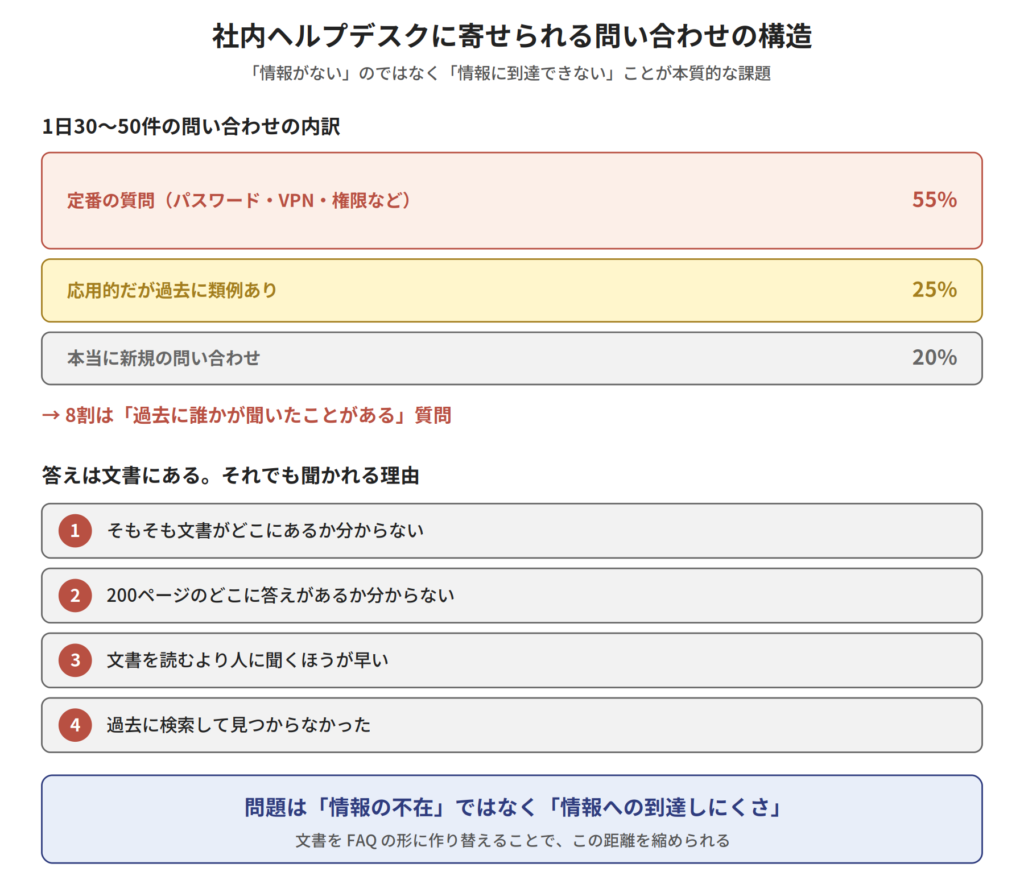
Structure of inquiries received by the internal help desk
1. The majority of questions have been asked before.
Password resets, VPN connections, printer setup, shared folder permissions, and software installation requests—these "standard" inquiries account for a large proportion of the total number of inquiries.The content is something I've answered many times before.is.
2. The answer is written in the document.
Moreover, the answer exists somewhere within the company in the form of a document: an operation manual created by the IT department, an administrator guide provided by the vendor, or a procedure manual created during system implementation.It's not that there's "no information".
3. We still receive inquiries.
Why is that? There are several reasons.
- The user is that the documentI don't know where it is.
- Even if you open the document,I don't know where the answer is in the 200 pages.
- in the first place,It's faster to ask someone than to read a document.I have determined that
- I've had the experience of searching in the past and not being able to find it.I've given up from the start.
In other words, the problem is not the "absence of information" but "Difficulty in accessing information"is.
4. Exhaustion of the help desk staff
From Mr. K's perspective, repeating the same explanation feels like a waste of time. In addition, there's the problem of inconsistent response quality depending on the person handling the inquiry. When veteran A answers, the information is accurate, but when newcomer B answers, it's roundabout.The organization's response is not standardized.That's right.
And the most serious is,The time needed to improve this situation is being consumed by daily tasks.That's the problem. I know creating an FAQ would make things easier, but I don't have the time. It's a classic vicious cycle.
If we have RAG, isn't an FAQ unnecessary?
This naturally raises a question:If we implement RAG in the first place, wouldn't it be possible to answer questions directly from the documentation without having to create FAQs?”
That's a very valid question. In fact, if you implement Super RAG and register internal documents, simply asking "I can't connect to the VPN" will bring up relevant descriptions and provide an answer. This is a significant step forward.
however,Areas that are difficult to reach with RAG aloneIt is true that this exists. There are three structural reasons for this.
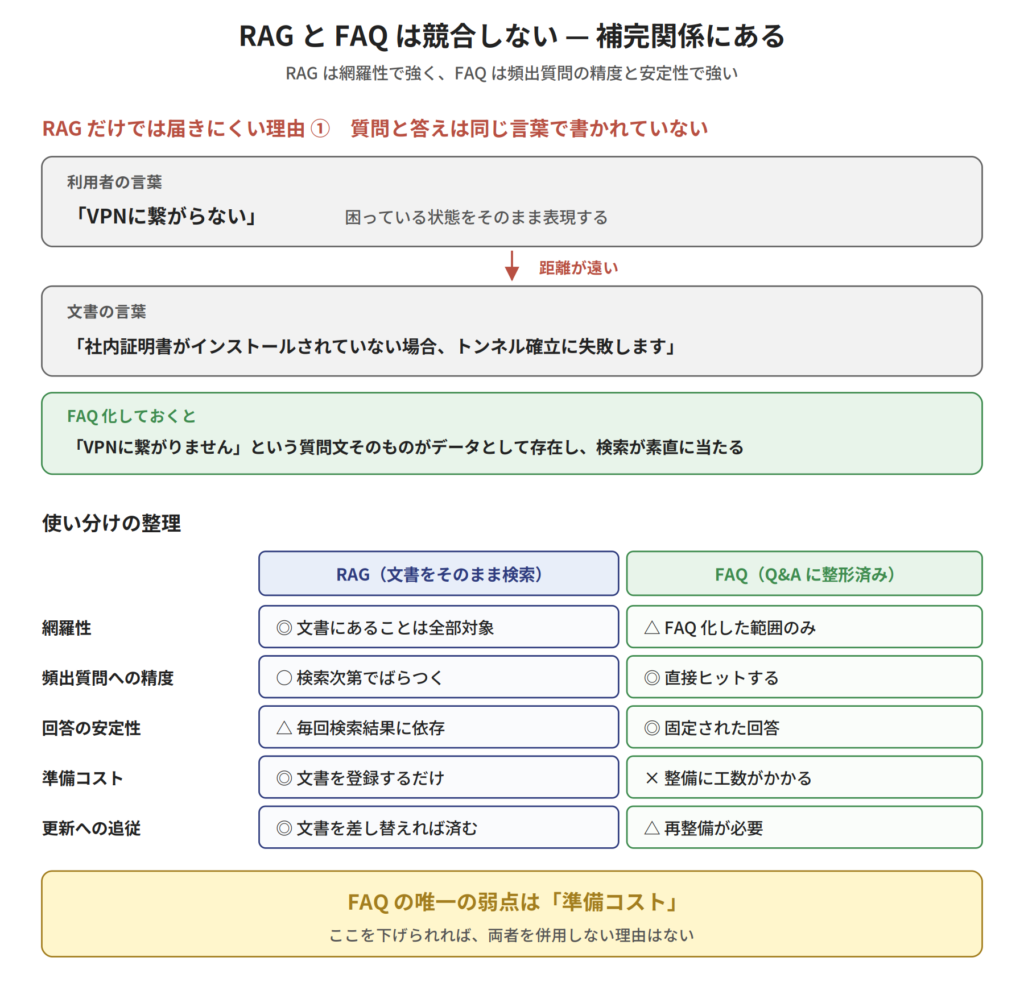
Complementary relationship between RAG and FAQ
Reason 1: The question and answer are not written in the same words.
RAG searches select candidates based on the "closeness" between the question and document chunks. As introduced in the fifth lesson, hybrid search allows for selection based on both semantic similarity and word matching, but still...Fundamental gapThat remains.
Users sayUnable to connect to VPN"I hear that. However, the document says "Prerequisites for connectivity in remote access environmentsIt says, " or "If the company certificate is not installed, the tunnel establishment will fail.It says, "Humans understand that it's the same thing, but the search distance isn't necessarily close..
If it's already been made into an FAQ, this conversion willIt has already been done.The question itself, "I can't connect to the VPN," exists as data, so a search will yield straightforward results.
Reason 2: The answer is scattered across multiple documents.
In practice, it's not uncommon for the answer to a single question to be scattered across multiple documents and pages. RAG retrieves multiple related chunks,The chunks drawn are merged on the spot each time.This will result in...
This is possible, butThe integration process is redone with each response generation.That's also true. The quality of the integration depends on the search results at that time. If an important sentence isn't picked up by the search, it will be missing from the answer.
If you make it into an FAQ,The integration will only happen once.That's right. Moreover, as will be explained later, it has gone through a review process, so if there are any omissions or errors, people will notice.
Reason 3: The document doesn't tell you where the "answer" is.
The document is not written as an FAQ. Specifications are structured according to their respective logic, and manuals are structured according to their respective logic, outlining specifications and operating procedures.It hasn't been organized from the perspective of "common problems users face."That's right.
Creating FAQs is the process of shifting this perspective.From the logic of documents to the logic of usersThis transformation is the very essence of the value of FAQs.
Conclusion: RAG and FAQ are complementary.
In other words, RAG and FAQ are not a matter of "either one or the other," but rather "Both"is.
| RAG (Search documents directly) | FAQ (formatted as Q&A) | |
|---|---|---|
| comprehensiveness | ◎ Everything written in the document is included. | △ Only the parts that have been turned into FAQs |
| Accuracy in answering frequently asked questions | ○ Varies depending on the search results | ◎ Direct hit |
| Stability of responses | △ Depends on search results each time | ◎ Fixed answer |
| Preparation costs | ◎ Just register the document | × Maintenance is time-consuming. |
| Keeping up with updates | ◎ It can be solved by simply replacing the document. | △ Redevelopment is necessary |
RAG excels in comprehensiveness, while FAQ excels in the accuracy and stability of its frequently asked questions.Ideally, the frequently occurring areas would be covered by FAQs, and everything else would be handled by RAG.
And in this table The only weakness of FAQs is "preparation costs".That's it. If this issue can be resolved, there's no reason not to use both together.The main topic of this article is precisely how to reduce these preparation costs.is.
Why isn't the development of FAQs progressing?
So, what exactly are these "preparation costs"? "Just create an FAQ"—it's easy to say, but actually doing it takes far more effort than you might imagine. Let's break down the experience of Mr. K, who attempted this only once in the past but gave up halfway through.
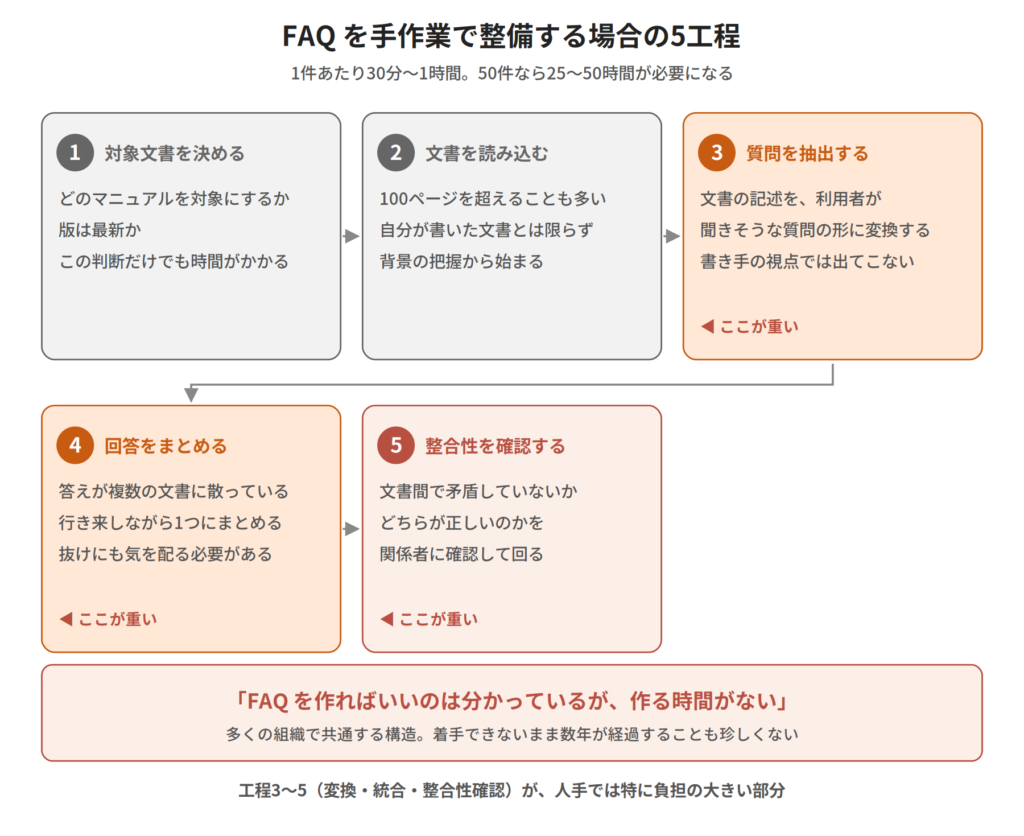
Five steps for manually organizing FAQs
Step 1: Determine the target document
First, we need to decide which document to use for the FAQ. There are more than 10 different operation manuals, and three of them are outdated. Deciding which one to use is a time-consuming process.
Step 2: Read the document
Once you've decided on the target, you actually start reading. It's not uncommon for a single operation manual to exceed 100 pages.Moreover, K himself does not know everything.This includes documents created by other departments and documents left behind by previous employees.
Step 3: Extract the questions
As I read, I pick out the parts that seem like they could become FAQs. This is the most intellectually demanding part of the process.Convert the document description into the form of "questions that users are likely to ask."It is necessary.
For example, suppose a document states, "Installation of the company certificate is a prerequisite for initial VPN client setup." If we were to turn this into an FAQ, the question would be:I can't connect to the VPN. What should I check?" or "Please tell me the initial setup procedure for VPN."Is that so?"The original description and the user's words do not match in the first place..
Step 4: Compile the answers
Once the question is decided, write the answer. A common issue here is...The answer is not written in one place.This is the problem. The VPN connection procedure is in the operation manual, the method for obtaining certificates is in a separate procedure document, and troubleshooting is in past incident records—and so on.It is scattered across multiple documents.That's the norm. To combine all of this into a single answer would require switching between multiple documents.
Step 5: Verify consistency
What's even more troublesome is,The descriptions in the documents are inconsistent.Here's a case study: The old manual and the new procedure manual have different procedures. The way things are done varies from department to department. Finding these inconsistencies, determining which is correct, and confirming with relevant parties if necessary—only after doing all of this is a single FAQ completed.
Results: 30 minutes to 1 hour per case
Based on K's experience, it took an average of 30 minutes to an hour to create one proper FAQ entry.If you want to create 50 items, it will take 25 to 50 hours.It wasn't realistic to find time for this in between daily tasks.
This is the reality of "We know we should create an FAQ, but we can't."And this structure is common to all organizations..
FAQ Builder Architecture — 6 Phases
Cinnamon AI offers a demo application that utilizes the Super RAG API:FAQ BuilderWe are developing a feature that semi-automatically generates FAQs from a set of documents, and allows them to be published after review.
Similar to the "document vs. document" search introduced in the previous installment (the 7th installment),We use Super RAG as a component and assemble the higher-level logic in-house.This is the configuration for pattern ②. However, its intended use is significantly different.Batch processing that reshapes knowledge data, rather than real-time searching.This corresponds to [the relevant category].
The process is divided into six phases. Rather than simply "passing the document to LLM to create an FAQ,"Dividing the process into separate steps has design significance..
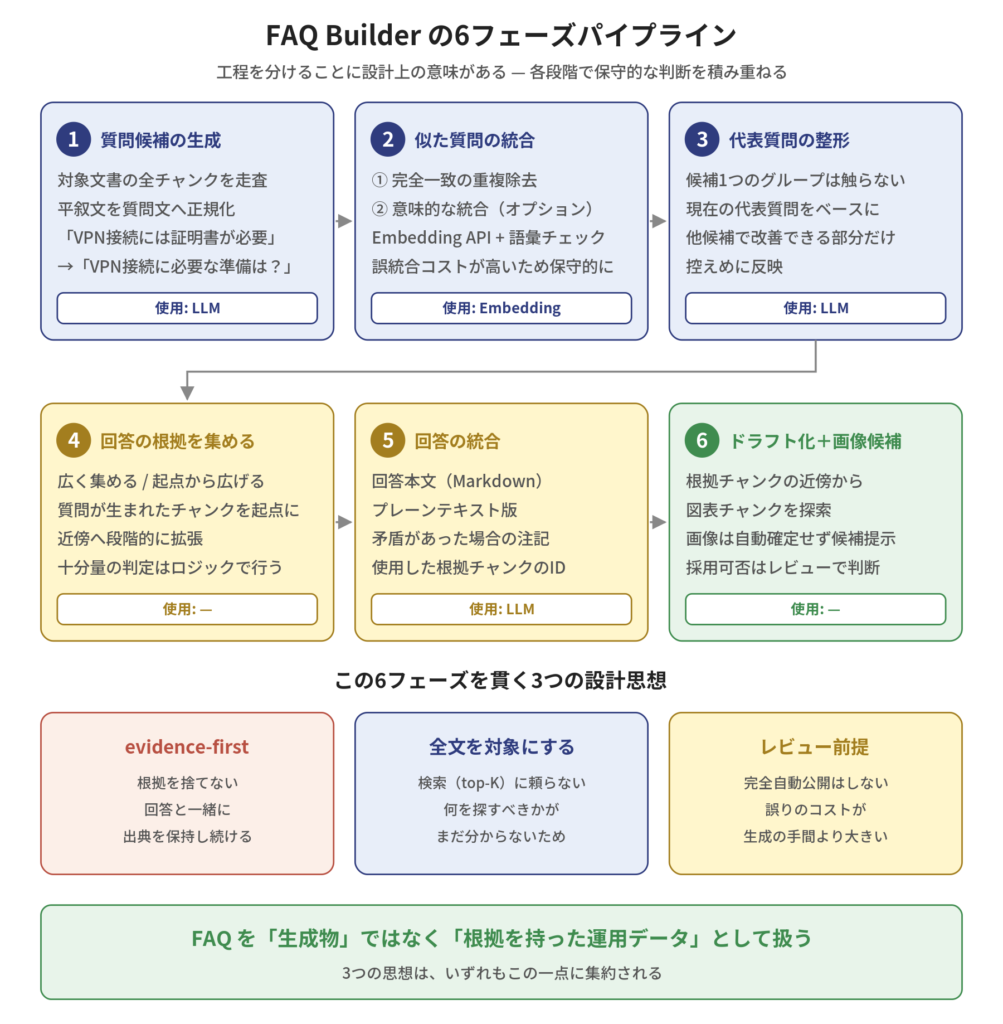
FAQ Builder's 6-Phase Pipeline
Phase 1: Generating candidate questions
First, the target documentWe scan all chunks to generate potential questions.This is the process of picking out descriptions from the document that seem likely to be valid questions.
What's important here is,Normalize declarative sentences into questions.It's a feature. The document says, "A company certificate is required for VPN connection." Instead of searching using this as is,What preparations are needed to establish a VPN connection?This is converted into a question: "...". The conversion from "document logic to user logic" that I mentioned earlier takes place here.
The extent to which this conversion is performed can be controlled in the settings.
- Modest modeFocus on sections of the document that contain explicit questions or headings that closely resemble them, and turn them into FAQs.
- Active modeHeadings, descriptions, procedure names, and other elements can be broadly converted into questions.
In documents like manuals and proposals, which aren't written in the form of questions but essentially contain FAQs, a proactive approach is effective.
Phase 2: Integrating similar questions
When scanning the entire text,A large number of similar question options will appear."How do I connect to a VPN?", "How do I connect to a VPN?", "What are the steps for remote connection?" — These are essentially the same question.
Therefore, we will consolidate the candidate questions. However, hereCaution is necessary.is.
In the FAQ,The cost of incorrect integration is very high.This is because if you combine two questions that seem similar but have different conditions into one, one of the conditions will be omitted from the answer. Users may not notice this and may perform the wrong procedure.
Therefore, the integration will be carried out in two stages, and in a conservative manner.
- Remove duplicates for exact matches and near matchesFirst, mechanically group together only the obviously identical questions.
- Semantic integration (optional)Using the Super RAG Embedding API, we measure semantic similarity and also check for vocabulary matching.ConservativeIntegrate
"Don't integrate things based solely on semantic similarity"—this is the key point of this design. As introduced in the fifth installment...Meaning and words are two sides of the same coin.This idea is proving effective here as well.
Phase 3: Formatting the Representative Questions
The merged group contains several potential questions. From these,Representative questionSelect and adjust as needed.
A conservative approach is being adopted here as well.
- For groups with only one candidate, perform this process.Not applicable(Because there is no need to touch it)
- Even in groups with multiple candidates,Based on the current representative questions
- Only the parts where the expression can be improved with other candidates,Reflect understatedly
Rather than "combining multiple questions to create a new question,"Slightly modify existing questions to make them sound more natural.This is its intended purpose. It's designed to prevent unnatural question sentences from being created through forced synthesis.
Phase 4: Gather the evidence for the answer
Once the question is finalized, the next step is to gather the information for the answer.The trade-off between cost and comprehensiveness is the strongest.This is a part of it.
FAQ Builder offers two modes.
Wide-gathering modeThis method gathers evidence from a wide range of documents related to the question. While it offers comprehensive coverage, it also increases the amount of work required.
Modes that expand from the starting point:From which chunk did that question originate?Starting from that point, the scope is gradually expanded to neighboring chunks within the same document. It stops once a certain amount of evidence has been collected.
What's interesting about the latter design is,LLM is not used to determine whether "sufficient evidence has been gathered."It's a point system. The judgment is based on mechanically measurable criteria such as the number of chunks or characters.The decision-making process for cost reduction aims to avoid generating unnecessary costs.This reflects the idea that is being expressed.
Phase 5: Integrating responses
Based on the collected evidence, we construct the answer. The output will not only consist of the answer text.
- Answer body(Markdown format)
- Plain text version(For transfer to external systems)
- Notes in case of inconsistencies
- List of IDs of the evidence chunks actually used
The last "ID of the evidence chunk usedThe key to this design is that it outputs "[this information]". This allows us to accurately trace "where in the document this answer is based" in later stages of the process. We will explain this in more detail in the next section.
Phase 6: Drafting and assigning image candidates
Finally, save the generated Q&A as a draft.Possible diagrams or images related to the answerThis will also be presented.
Here's how it works: From the "ID of the evidence chunk used" obtained in Phase 5, it selects the nearest one.Chart chunksWe will search for it. Thanks to DocReader's structure preservation feature, which we introduced in the fourth installment, the figures within the document are saved with their location information intact, so we can identify "the figure that was near this description."
however,Images are not automatically confirmed.It was presented merely as a "candidate,"The reviewer will decide whether or not to hire them.While diagrams greatly aid understanding in manuals, making this feature effective, there is also the risk of irrelevant diagrams being included.
Design Philosophy ① Evidence-first — Never abandon the evidence.
Here, we will introduce three principles that underpin the design of FAQ Builder.Do not treat FAQs as generated data.It all boils down to this one point:
At first evidence-related The generated FAQ is not just text,Data with supporting evidenceIt will be saved as such.
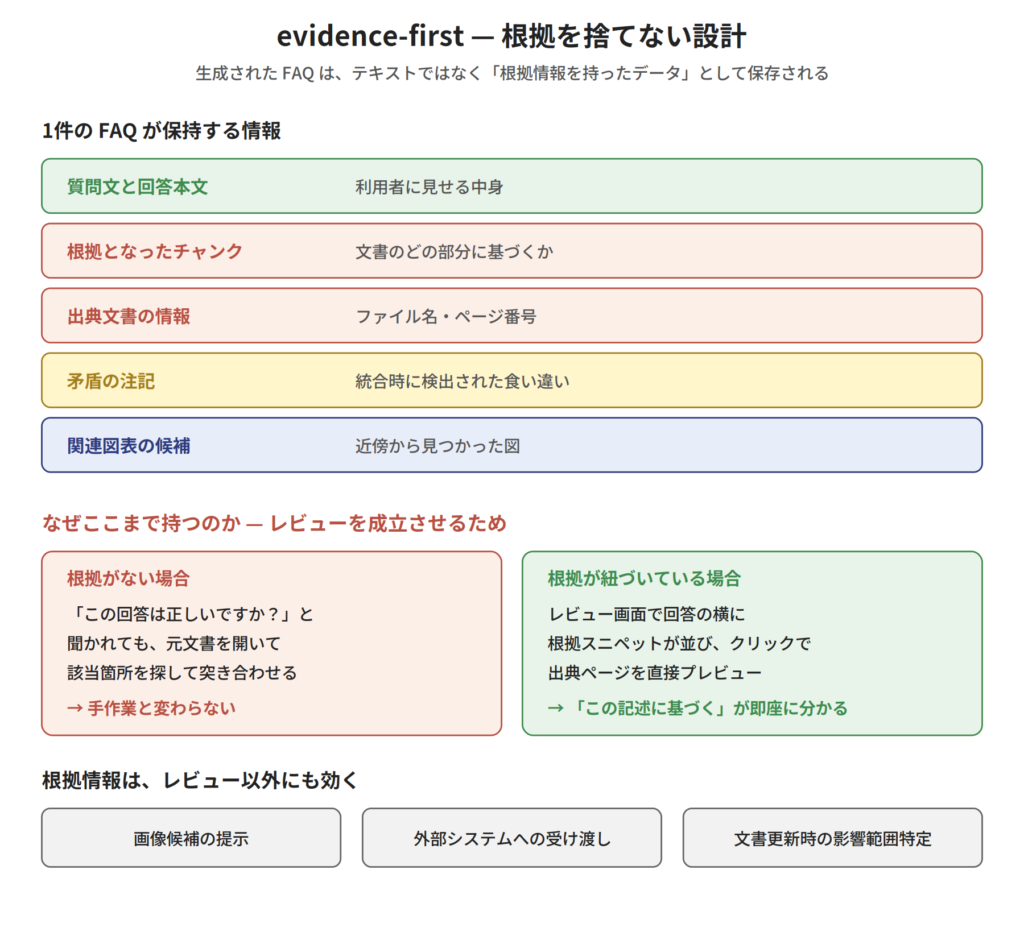
Structure of evidence-baby
Specifically, one FAQ entry contains the following information:
- Question and answer text
- The chunks that formed the basis of the answer(Which part of the document?)
- Source document information(File name, page)
- Notes on inconsistencies detected during integration
- Related charts and graphs
Why does it last this long?In order to complete the reviewis.
If you're only shown the generated response and asked, "Is this correct?", you can't make a judgment. You'd have to open the original document, find the relevant section, and compare them—that's no different from doing it manually.
If there is supporting evidence, the situation changes. On the review screen, supporting snippets are displayed next to the answer, and if you click on them...The relevant page of the source document is displayed in preview.For PDFs, it will open the relevant page; for Office documents, it will display a cached preview."This answer is based on this statement in this document" can be confirmed immediately.That's the reason.
This was introduced in the 6th installment. Inline citation highlight It's the same idea. The other one was a feature that allowed you to track the basis of chat responses sentence by sentence, but this one is for tracking the basis in FAQ generation.The philosophy of "providing evidence" permeates the entire Super RAG product line.But this is evident here as well.
And this evidence-based information is useful beyond just reviews.
- Image candidate presentation: You can find the diagram in the vicinity of the evidence chunk.
- Transfer to an external system: Can be exported including source information.
- Future reprocessingWhen a document is updated, the scope of the impact can be identified.
The decision not to abandon the underlying principles forms the foundation for all subsequent functions.
Design Philosophy ② Target the entire text — Deliberately avoid relying on search engines.
The second idea might come as a bit of a surprise.FAQ Builder does not use search (top-K retrieval) during the question generation stage.The target documentScan all chunksTo do.
In the context of RAG, the standard approach is to "retrieve the top K relevant results." Why aren't we doing that here?
The reason is,When creating an FAQ, it's still unclear "what you should be looking for."That's why.
In a typical RAG, the question comes first. Because there is a question, you can search for something similar. However, in FAQ generation,I will create that question now.That's the problem. Even if you try to search to decide "what should be included in the FAQ," you won't have a search keyword.
Even if you search using general keywords like "Frequently Asked Questions,"There is no guarantee that the most important information in a document will appear at the top of the list.In fact, the "easily overlooked exception conditions" that should be included in FAQs are precisely the ones that are most difficult to find through searches.
Therefore, FAQ Builder,View full textWe will adopt this straightforward approach. We will prioritize comprehensiveness above all else.Costs will be optimized through other means.That was the design decision.
That "alternative method" was mentioned in the previous section.Strategies for gathering evidenceis.
- Modes that expand from the starting pointStarting from where the question originated, gather only the necessary and sufficient evidence.
- Use of intermediate expressions(Optional): Pre-structure and retain the key points of the document so that the entire chunk does not need to be resent when generating the response.
In other words,While adhering to the principle of "targeting the entire text," we aim to reduce unnecessary reprocessing.This is how we are keeping costs down. Instead of lowering costs by sacrificing comprehensiveness, we are increasing efficiency while maintaining comprehensiveness.
In addition,The cost limit is visible before execution.A system is also in place.
- Limit on the number of AI calls
- Upper limit of input and output tokens
- Upper limit of the number of candidate questions that can be generated
TheseDisplay before executionYes, it will. It's not a precise prediction, but rather an upper limit, but it's sufficient to prevent situations where "unexpected costs were incurred without us realizing it."It allows you to notice when you've expanded the scope of the target documents too much before running the program.—This is a very important feature from an operational standpoint.
Design Philosophy ③ Review Premise — The Decision Not to Fully Automate
The third point is perhaps the most important idea. FAQ Builder is,We do not intend for the FAQ to be published completely automatically.The generated output is always a "draft".It will be published after being reviewed by others..
This is not a technical limitation,Intentional design decisionsis.
FAQs are treated as official internal answers. If an incorrect FAQ is published, users who believe it may perform incorrect actions.The cost of the error is greater than the effort required for generation.—This decision led to the design that requires reviews.
Reviewers can make one of four judgments for each FAQ.
| judgement | meaning |
|---|---|
| approval | Publish this FAQ |
| Rejected | There is an error in the content. |
| Unnecessary | The content is correct, but it will not be adopted as an FAQ. |
| on hold | To postpone making a decision |
What I'd like you to pay attention to isUnnecessaryIt's not that it's "wrong", but rather thatThere is no need to make it an FAQ.It has the option to make that judgment independently.
In practice, this distinction is useful. Among the generated Q&A, there will be some that are technically correct but "no one would ever ask that question." If you simply dismiss these as "rejected,"When you look back at it later, you might get the wrong impression that "there was some kind of problem."The fact that there is a judgment of "unnecessary" meansIt can be accurately recorded as an inventory record.That's the reason.
In the practice of review,The validity of the answer and its supporting evidence is more important than the question itself.This is because even if the question is slightly unnatural, the actual harm is small, but if the answer is wrong, the harm will be real. For this reason, the review screen is structured to make it easy to check the evidence—evidence snippets are lined up next to the answer, and clicking them will take you to a source preview.
Also, the FAQs that passed the review were "Fixed per versionThe FAQ will not be automatically updated even if the original document is updated after publication.When the original document is updated, the draft is marked as "outdated" and undergoes the process of regeneration → re-review → republication..
It may seem troublesome at first glance, but this decision was made to prioritize operational stability.The publicly available FAQ has changed without my knowledge.This situation is not desirable as an official response within the company.
Operational flow using four screens
The system described so far is operated using four screens.
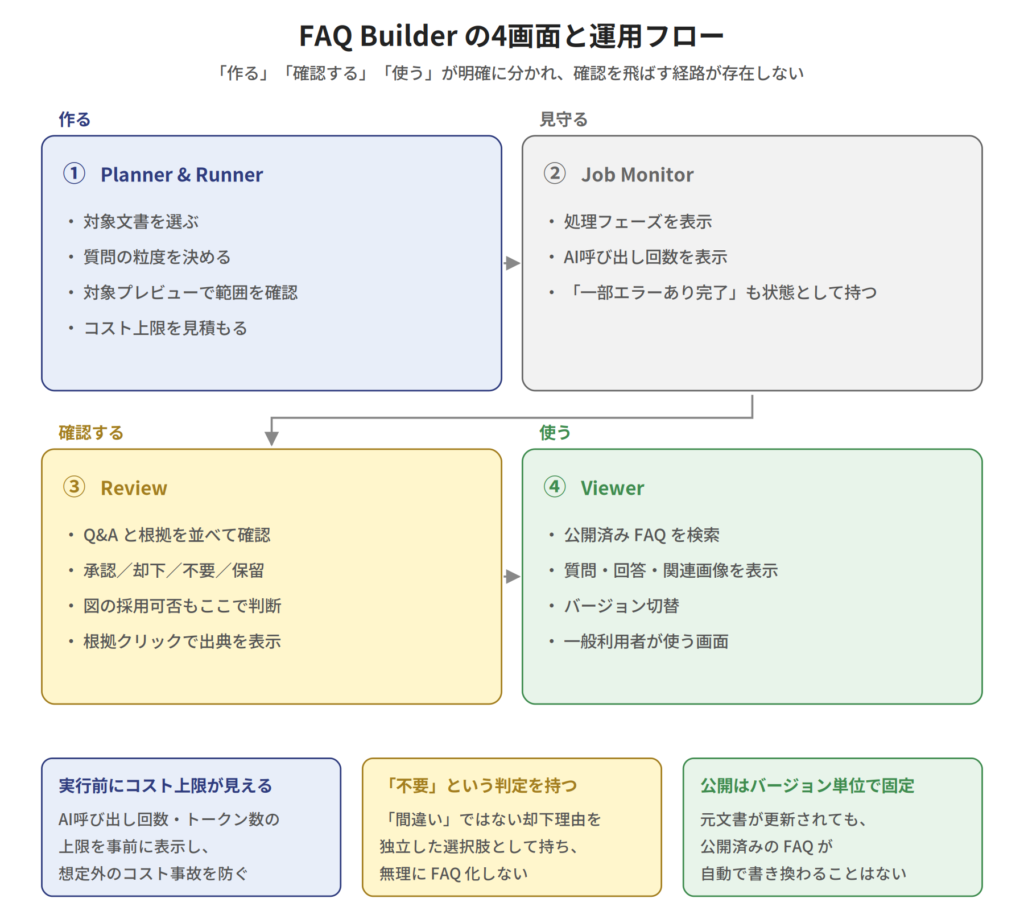
FAQ Builder 4-Screen Flow
① Planner & Runner — Decide what to focus on and how to create it.
Select the target document collection and filter by file name pattern. In addition, set the generation policy.
- Question granularity: Three levels: General overview / Standard / Detailed
- To what extent should we allow conversion from declarative sentences?
- Maximum number of drafts to keep
Once you've configured it, you can perform two checks before execution.Preview of the target document(Is the filtering done as intended?)Cost upper limit estimate(As introduced in the previous section). You can proceed after checking both.
② Job Monitor — View the processing status
Since the generation process takes time, a screen is provided to check the progress. You can see information such as which phase you are currently in and how many times the AI has been called.
What's distinctive here is,Completed with some errors.The point is that it has the state of "even if all phases are not completed perfectly, if a draft has been generated, it will be treated as that state.We don't discard partial results.The diagnostic information, which records what happened at each phase, allows for troubleshooting and identification of the cause.
③ Review — Approve while reviewing the evidence.
This is the review screen introduced in the previous section. On the left is a list of Q&A, and on the right are evidence snippets and source previews. You will decide whether to approve, reject, discard, or hold while reviewing the evidence. If there are candidate diagrams, you will also decide here whether to adopt them.
④ Viewer — Use the publicly available FAQ
This screen displays approved FAQs that are publicly available for general users to search and view. Questions, answers, and related images are shown, and users can also switch between versions.
The order of these four screens reflects the operational philosophy.The processes of "making," "checking," and "using" are clearly separated.There is no way to use it without confirmation..
Relationship with Glossaries — FAQs and dictionaries have different roles.
Now, let's return to the topic of the sixth lesson. Dictionary preprocessing was a function that "automatically standardizes queries before searching if you register a glossary."
FAQs and glossaries are both "supplementary data created from documents," but their roles are completely different..
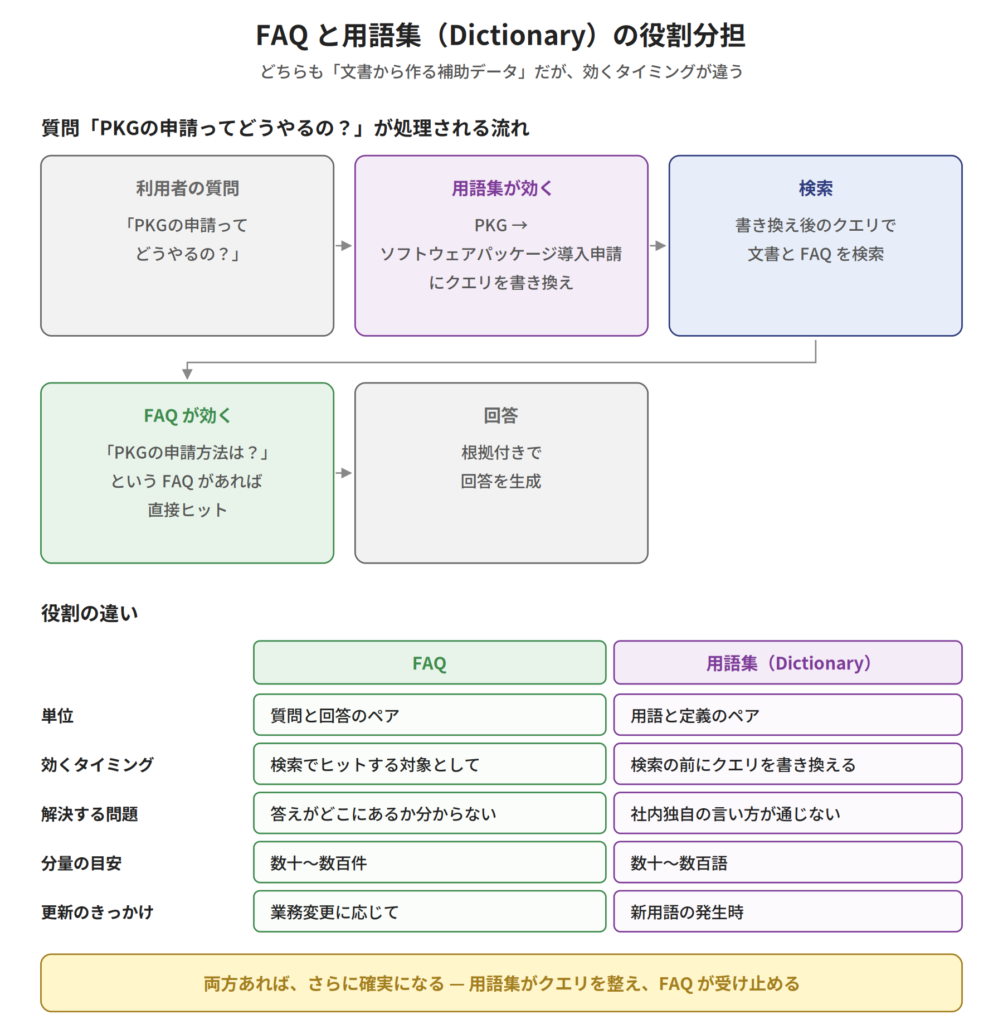
Division of roles between FAQ and glossary
| FAQ | Glossary | |
|---|---|---|
| unit | Question and answer pairs | Term and definition pair |
| Timing of effectiveness | As for what will be found in the search results | searchbeforeRewrite the query |
| Problem to solve | "I don't know where the answer is." | "Internal terminology doesn't translate well to search results." |
| Approximate amount | Dozens to hundreds of cases | tens to hundreds of words |
| Update frequency | In response to changes in business operations | When new terminology is introduced |
Let's consider a specific example. At Mr. K's company,How do I apply for a package deal?Let's say you get the question, "What is the answer to this question?"
Within the company, "PKG" is used as an abbreviation for "Software Package Installation Application," but the official name is used in documents.
- When a glossary is usefulBy changing "PKG" to "Software Package Installation Application" before searching, the search results will arrive in documents written with the official name.
- When the FAQ is helpfulIf there is already an FAQ titled "How do I apply for a PKG?", it will hit directly.
Having both makes it even more certain.The glossary organizes the queries, and the FAQ receives them. The "Dictionary Preprocessing" introduced in the 6th installment and the FAQ in this article are linked in this way.
and,The same challenges exist in creating glossaries.It's true that "registering a glossary will be effective," but creating that glossary is done by people. Identifying abbreviations used within the company, confirming official names, and compiling variations in spelling—this, like maintaining an FAQ, is a time-consuming task.
FAQ Builder currently specializes in generating FAQs,The very idea of "extracting supplementary data from a document" can also be applied to glossaries.This is the direction we're taking. The process of extracting frequently occurring abbreviations and technical terms from a document, finding their definitions, and presenting them as candidates for a glossary is quite similar in structure to FAQ generation.
There are two exits — to the FAQ management software, or to RAG.
There are two main uses for the generated FAQ.It can be routed to both, not just one or the other.That is a key design feature of FAQ Builder.
Exit 1: Import into existing FAQ management software.
Many companies already use some form of FAQ management system or knowledge base product. Internal portals, service desk tools, help center products—these are all things that need to be integrated into.FAQ Data PreparationIt can be used as such.
In this case, Super RAG is a "tool for creating FAQs," and its final use will be on an existing system.Instead of discarding existing assets, enhance their contents.That's the approach.
Exit 2: Register as a search target for RAG
Another thing is to use the generated FAQSimply re-register to Super RAGHere's how to use it. This is where the content from the fourth lesson comes into play.
In the fourth installment, we introduced that "a dedicated chunker is selected according to the properties of the material," and among them... FAQChunker(There was a rule that treated Q&A pairs as a single unit.)The data generated by FAQ Builder is precisely the format that FAQChunker excels at..
In other words,
- Register the document in Super RAG.
- Generate FAQs with FAQ Builder
- Review and approve
- Register the generated FAQ with Super RAG.
- From now on, frequently asked questions will be directly addressed in the FAQ, while other questions will be handled by the original document.
This creates a positive cycle.A two-tiered structure consisting of documents and FAQs.This is how the knowledge base is constructed.
The advantages of this structure are the "comprehensiveness of RAG" and the "accuracy and stability of FAQ" as shown in the comparison table above.You can have both.It is the matter.
The story continues — How did K's work change?
Let's go back to Mr. K from the beginning. What changed after using FAQ Builder?
First attempt: 80 cases in 3 days
The first thing Ms. K started with was the one that received the most inquiries.VPN, account management, shared folder permissionsThese were the three areas. We will generate FAQs for a total of five related operation manuals.
Approximately 120 drafts were generated. Now we'll begin the review. What K actually did was:
- Compare the answer with the supporting evidence to verify it.
- Clearly unnecessary items are removed by marking them as "unnecessary".
- Let's revise the expression slightly.
- Items based on outdated descriptions will be "rejected" and added to a list of documents to be revised later.
result,80 items were approved and published.It was done. The work was done in between other tasks.Effectively 3 daysThis represents a significant reduction compared to the manual estimate of over 40 hours.
Secondary discovery: Problems were found with the document itself.
What was interesting was the process of the reviewThe problems with the document were made visible.That's the point.
- The VPN connection procedure is described inconsistently across the three documents.
- One procedure manual is written based on the assumption of a system that was discontinued two years ago.
- The authorization request flow differs from the actual operation.
These issues became apparent because a "contradiction note" was added to the generated FAQ.The process of creating the FAQ also served as an inventory of our documents.That's why Mr. K created a document update list.
Changes in daily life
Two months after its release, the usual inquiries have noticeably decreased. They haven't all disappeared, however...We can now advise users to "Please check the FAQ first."K says it's a big deal.
Furthermore, the standardization of responses has progressed. Even when new employee B is handling a case, they can refer to the FAQ.Same answer as the veteranThis is possible. This was an effect that Mr. K had not initially anticipated.
Remaining work, increased work
On the other hand, not all jobs have disappeared.FAQ maintenanceThis creates new tasks. When the system is updated, the FAQ also needs to be reviewed, and if new inquiry patterns emerge, they need to be added.
However, Ms. K is taking this in a positive light.Creating something from scratch versus fixing something that already exists is a completely different level of burden.That's why. And because there's a regeneration mechanism, when there's a major document update, you just need to run FAQ Builder again.
[Materials to take home for consideration] Inventory sheet for documents that could be turned into FAQs
For those who think, "We might also have documents that should be turned into FAQs,"A simple sheet for making estimates without actual data.We have prepared this for you.
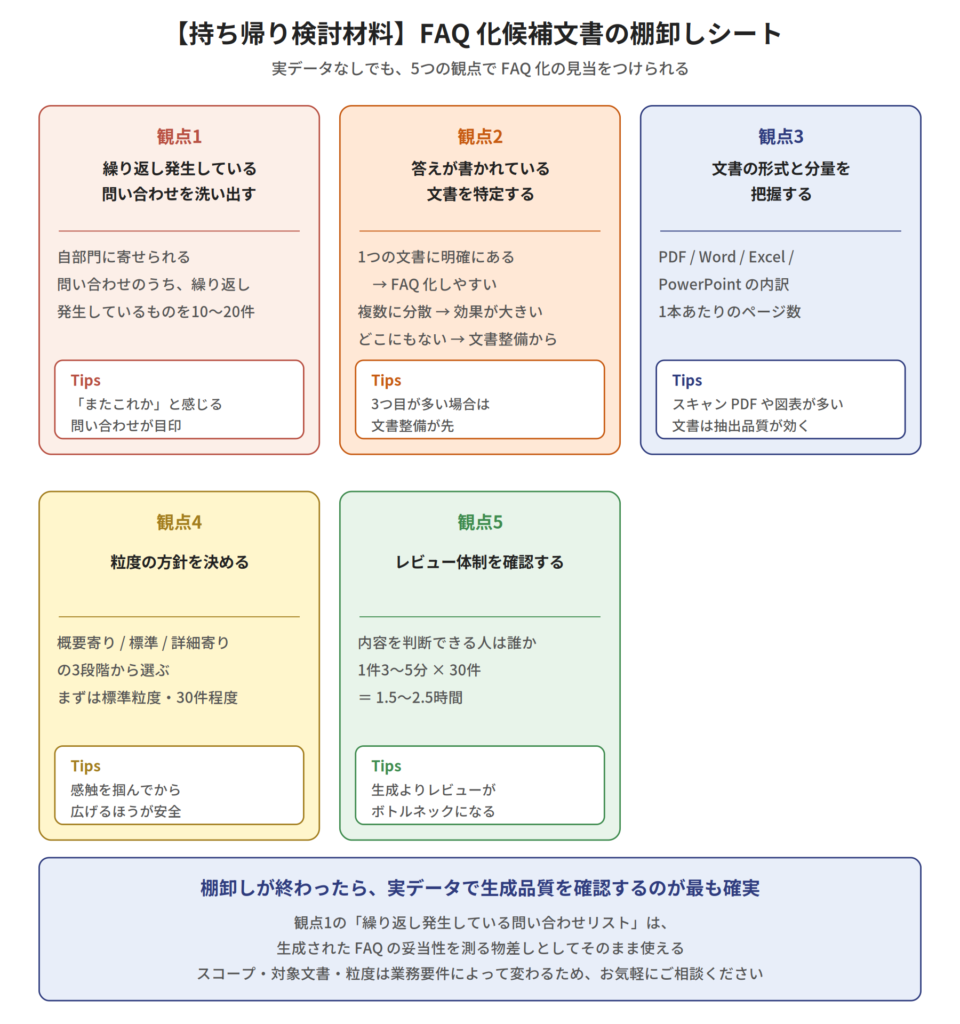
Inventory sheet for documents to be turned into FAQs
From five perspectives, each is:Tasks / Points to Check / TipsWe will focus on this point.
Perspective 1: Identify recurring inquiries.
First, among the inquiries received by our department,things that happen repeatedlyPlease list 10 to 20 items. If you have an inquiry management system, you can use that to aggregate the data, but if not, the person in charge's estimate is fine.
TipsLook for inquiries that make you think, "Oh, this again?" Arranging them in order of frequency will help you prioritize them later.
Perspective 2: Identify the document containing the answer.
Regarding the inquiries raised in Perspective 1,Which document contains the answer?Let's check this. This divides into three patterns.
- It is clearly written in one document. → Easily turned into an FAQ
- It is scattered across multiple documents. → The effect of creating FAQs is significant.
- It's not written in any document. → First, the documentation needs to be organized.
TipsIf the third pattern is the most common, documentation preparation is necessary before creating an FAQ. This assessment is the first crucial step.
Perspective 3: Understand the format and length of the document.
Documents that may be relevant are:In what format and in what quantity?Please check the following: How many PDF, Word, Excel, and PowerPoint files are there? How many pages are in each file?
TipsWhen dealing with scanned PDFs or documents containing many tables and figures, the extraction quality discussed in Part 4 becomes crucial. Understanding this at this stage will make designing your trial easier.
Perspective 4: Determine the granularity policy.
How detailed should the FAQ be?We will decide on a policy in advance..
- SummaryA broad question like, "What is the purpose of this system?" The number of questions is small, and it's introductory.
- standardPractical questions such as: "What is required for this procedure?"Let's start here.
- DetailedThis includes even exceptional conditions like, "What's different when condition X is met?" The number of cases increases, and so does the review load.
TipsIt's safest to start with a standard level of detail and limit the number of items to around 30. Expanding the scope after getting a feel for it makes it easier to control the burden of the review process.
Perspective 5: Check the review system.
Creating FAQs is based on user reviews.Who will do the review, and how much time can they dedicate to it?I will check it.
- Who can judge the content of the target area?
- How many minutes can be spent per case?
- How many hours can you dedicate per week?
TipsRather than the generation itself,Reviews become a bottleneck.Assuming 3-5 minutes per task, 30 tasks would take 1.5-2.5 hours. Having this estimate from the start allows you to create a realistic plan.
Next, we move on to verification with real data.
Once the inventory is complete, the most reliable way to verify the generation quality is to use actual data. Parameters such as scope, target documents, and granularity will vary depending on the business requirements.Please use the contact form at the end of the article.Please feel free to contact us for advice.
TipsIf you can organize and share the results from perspectives 1-5, the design of the initial trial will become much smoother. In particular, the "list of recurring inquiries" from perspective 1 can be used directly as a benchmark to judge the validity of the generated FAQ.
Next episode preview
Next time (episode 9),Use Case Example 3: AI Agent IntegrationThis time, we'll delve deeper into the expense review workflow with Dify integration that we introduced in the second installment, and explore what can be done when Super RAG is combined with an agent platform.
In the 7th installment (Document vs. Document Search) and the 8th installment (FAQ Generation), we introduced configurations that use Super RAG as a component. In the 9th installment,Combine with a general-purpose workflow platform.Now, let's look at the third form. Instead of writing the code in-house,Integrate Super RAG into a no-code/low-code agent platform.This is the approach.
summary
In the sixth installment, we explained that "if you register the glossary, Super RAG will automatically activate." This article will discuss what comes next.So, who will make it?This is the answer to the question, "..."
We have documents within the company. The answers are written in them. Yet the same inquiries keep coming back.It's not because the information is absent, but because it's difficult to access.Creating FAQs is an effective way to bridge this gap, but doing it manually takes 30 minutes to an hour per question, making it practically impossible to get started—this is the structure that is happening in many organizations.
FAQ Builder is an approach to reduce this preparation cost.Question generation, integration, representative question formatting, evidence gathering, answer integration, and drafting.The process is broken down into these six phases, and conservative decisions are made at each stage.
There are three core principles that guide the design.Don't abandon the evidence.(evidence-first)The entire text is included.(Prioritizing comprehensiveness without relying on search, and optimizing costs through other means), andAssuming a review(The decision not to fully automate the process.) In both cases, the goal is to create FAQs, rather than generating them.Evidence-based operational dataIt all boils down to one point: "to treat it as such."
There are two ways to output the generated FAQs: import them into existing FAQ management software, or re-register them in Super RAG.A two-tiered structure consisting of documents and FAQs.This is the way to create it. In the latter case, FAQChunker, which we introduced in the fourth installment, excels at this format.Materials prepared upstream are utilized in the downstream system.—The structure we've been discussing throughout this series is also present here.
Furthermore, RAG and FAQ do not compete with each other.RAG excels in comprehensiveness, while FAQ excels in the accuracy and stability of its frequently asked questions.We believe that this two-tiered structure, where FAQs handle frequently occurring areas and RAGs handle everything else, is the most practical and manageable approach.
If you think, "We probably have some documents that should be turned into FAQs," please try inventorying the five perspectives outlined in this article. If you then wish to verify this with actual data,Please feel free to contact us using the inquiry form at the end of the article..
<Articles in this series>
- [Part 1] Achieving a Quality Beyond Standard RAG — Technical Innovations Supporting Super RAG
- [Part 2] A Thorough Explanation of Three Embedded Patterns — Analyzing API Call Flows and Dify Expense Review
- [Part 3] API Function Catalog — What can be done, and what should be handled in-house?
- [Part 4] The Contents of Document Extraction — How is the Engine Selected?
- [Part 5] Hybrid Search and Reranking — Making the Most of Extracted Content by Balancing "Meaning" and "Words"
- [Part 6] Super RAG Answer Strategy — Design Decisions for Mastering Single-hop Answers and 3 Techniques to Support Answer Quality
- [Episode 7] Super RAG API Use Case: "Document vs. Document" Search — Searching past accidents and near misses from work plans to predict hazards (Scheduled for release in August 2026)