
technology

In the first installment, we introduced the overall picture and differentiating points of Super RAG, and in the second and third installments, we introduced API integration patterns and a function catalog. Up until now, the focus has been on providing a map of "how to use" it. From this installment onwards, we will change our perspective.What is happening inside Super RAG?—We'll delve into the "substances" that produce this precision.
The first thing we'll discuss is,Document ExtractionThat's it. The RAG mechanism works in the following steps: extraction → indexing → search → answer generation.The quality of the extraction at the entrance determines the ceiling of all the subsequent steps.This is a particularly strong premise within the design philosophy of Super RAG. If table cells are missed or figure captions are separated from the text, no matter how sophisticated the search algorithm or how high-performance the large-scale language model, it will be impossible to obtain the correct answer.
This article will explain how Super RAG designs this entry point, in particular.How does our in-house document comprehension engine, DocReader, structure its extraction process based on the characteristics of the file format and content?We will unravel the mystery. Engine names will be mentioned, but since the target audience is assumed to be non-engineers, we will proceed by focusing on the decision-making logic of "why this design works."
At the end of the article, it states that the items to consider taking home this time are:Checklist for comparison trials using our own dataWe have prepared this for you. If, after reading the article, you think, "I'd like to try this with my own documents," you can compare the results by running your actual data through our free or paid trial.Contact form at the end of the articlePlease feel free to contact us for a consultation.
This is the fourth article in the series. The series is structured into five chapters: (I) Why Super RAG, (II) How to implement it, (III) Visualizing the contents, (IV) What is happening in the field, and (V) Decision-making regarding implementation. Starting with this article, we begin Chapter III, "Visualizing the contents," and will sequentially cover the three pillars that support the accuracy of Super RAG in the following order: extraction (Part 4), search (Part 5), and response strategy (Part 6).
By Chapter II, you should have grasped the outline of "how to incorporate Super RAG," so from here on...This session will help you understand "why accuracy is achieved after the system is integrated."We'll move on to that. The purpose is not to replace the specifications, but to give you a map for making design decisions.
Actual business documents vary greatly in both format and content. Some are PDFs with clean text, others are scanned image PDFs from paper documents, some contain complex tables, others are elaborately laid out PowerPoint presentations, and even FAQs and glossaries written in CSV files. A wide variety of materials are mixed together within the same company knowledge base.
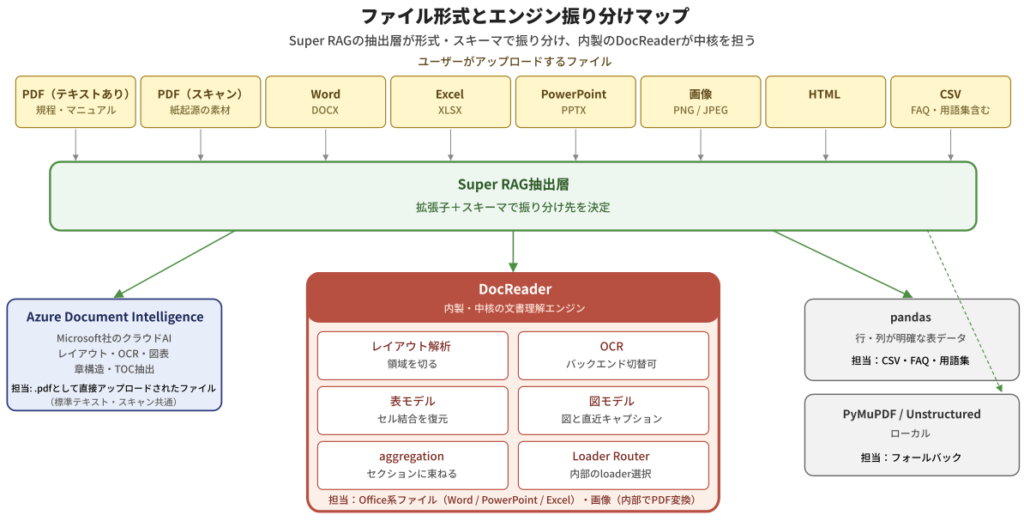
The Super RAG extraction layer utilizes this diversity.We don't try to handle everything with a single general-purpose engine..instead,The Super RAG extraction layer distributes engines according to the file format and content characteristics, with the in-house document comprehension engine DocReader at its core.—This is the design we've adopted.
File format and engine distribution map
DocReader is not a standalone OCR library or PDF parser. It combines layout analysis, OCR, table structure reconstruction, figure region extraction, and aggregation of results from multiple models into a single pipeline.Document comprehension enginein,Office files such as Word, PowerPoint, and Excel.or,Image files (PNG/JPEG)—In other words, materials with a high proportion of visual information / complex layoutsTo handle it all by one personThat is the central point of the design (some parts are converted to PDF internally by Super RAG before being processed by DocReader).
Other file formats will follow their respective paths.PDF with a standard text layerThis is Microsoft's cloud-based document analysis service. Azure Document Intelligence(Hereafter, Azure DI) will be used. CSV files with clearly defined rows and columns, and tabular data with a fixed structure such as FAQs/glossaries, will be handled by Azure DI.A pandas-based extractor that is robust to structured data.For file formats that are not detected or when the above engine is unresponsive, you can use PyMuPDF or Unstructured.Fallback pathWe also have that available.
What's important here is that, from the user's perspective,Simply drop in the files and the appropriate processing will begin.It's that simple. Users don't need to differentiate between APIs like, "PDFs go to this API, Excel files to another API, and images to the image API."The distribution will be handled on the Super RAG side.—That's the key point of the design, and the document processing API (POST /api/v3.3/actions/document-extract/) that we introduced in the third installment also shows users that the extraction layer makes decisions internally once a file is passed to it.
Here, I'd like to mention one distinctive design decision. The engine distribution was as follows:We will decide after actually analyzing the contents (layout) of the file.rather thanThe file extension, the column structure (whether it's for FAQs, a glossary, or a regular table), and the environment settings and upstream processing path are all important.It's a deterministic system where the decision is made solely based on that. You might think, "But how can you choose the optimal engine without looking at the contents?" but this is a trade-off. If we were to analyze the layout every time before distributing, we would have to run the layout analysis once just for distribution, and then perform the same analysis again in the main process.Double costThis will occur. Super RAG is "If the conditions are the same each time, assign it to the same engine each time.By adopting a deterministic design, we prioritize operational predictability, high-speed processing, and cost efficiency.The actual layout analysis is performed after the allocation is complete, examining the inside of each engine.—Azure DI handles it on the cloud side, while DocReader handles it internally—It will be done at.
Thus,While using our in-house developed DocReader as the core, we utilize powerful cloud services as needed.This hybrid configuration is a key feature of the Super RAG extraction system. By focusing each engine on the material it excels at extracting, it achieves a balance between extraction quality, operational flexibility, and efficiency.
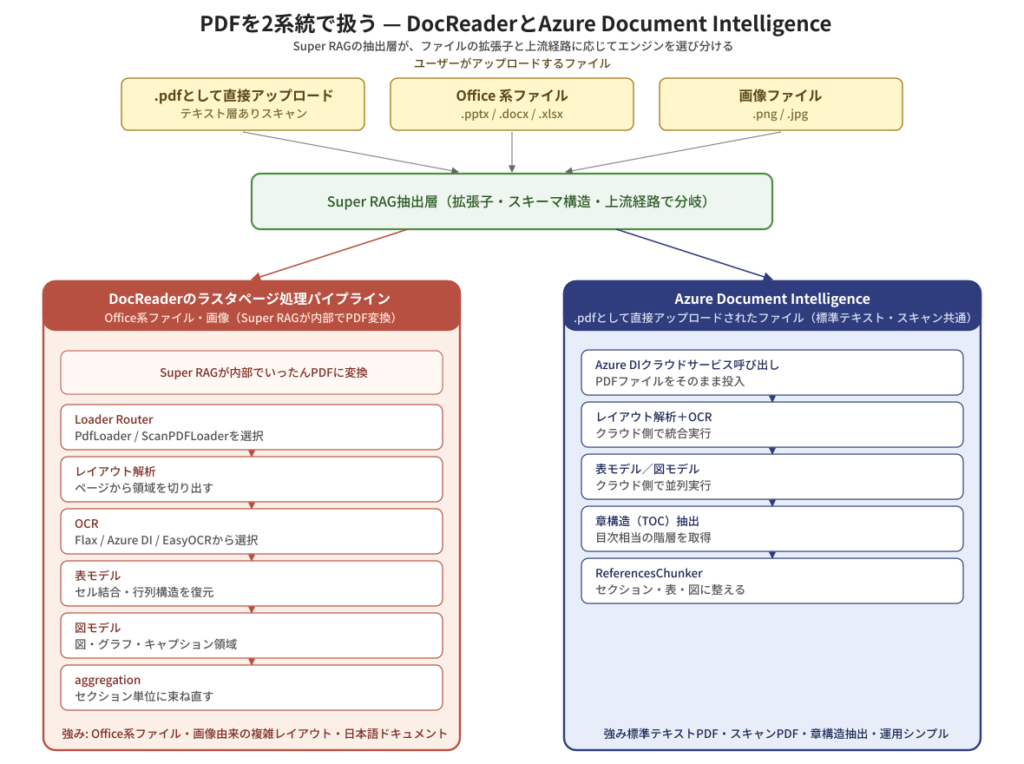
The core of the documents handled in practical work is undoubtedly PDF. Within Super RAG, the materials treated as "PDF" are:Users directly .pdf Uploaded filebut alsoWhen you upload Office files (Word/PowerPoint/Excel) or images, Super RAG internally converts them to PDF.This includes up to. Super RAG handles these "PDFs," which vary greatly in content and structure.Can be handled by two systemsIt is designed to be so.
Comparison of processing steps between DocReader and Azure Document Intelligence
One is,DocReader's raster page processing pipelineThis involves treating the page as an image and running a multi-stage process—layout analysis → OCR → table model → diagram model → aggregation—through an in-house pipeline. Office filesor,Image (PNG/JPEG) — these Super RAG internally converts to PDF. In the system that deals with —Materials with a high proportion of visual information / complex layoutIt will perform well there.
Another one is,Azure Document Intelligence(Azure DI) is a cloud-based document analysis service provided by Microsoft. It integrates layout analysis, OCR, and table/figure modeling, and is particularly strong in extracting chapter structure (equivalent to a table of contents). In Super RAG,users .pdf Files uploaded directly using their file extensionsBy default, these are routed to Azure DI. Both standard PDFs with a text layer and scanned PDFs without a text layer will be accepted by Azure DI as long as they are passed as .pdf files.
"Even though they are both 'PDFs,' they will be sorted by different engines." This decision is not made after analyzing the contents (layout) of the PDF,The path through which the file was transferred to Super RAG, and its extension and environment settings.It is determined by this. For example, if a user uploads a PowerPoint file such as a .pptx file, the upstream process converts it to PDF internally while maintaining the context that "this originates from PPTX" and passes it to the DocReader raster page processing pipeline. On the other hand, if the userExport the PowerPoint presentation to PDF beforehand. .pdf If uploaded asFor Super RAG, this is no different from receiving a regular .pdf file.By default, requests are routed to Azure DI.The intention isTo avoid confusing the materials that each engine excels at.So, Azure DI uses standard PDFs and documents with a clear chapter structure as documents.This raster page processing pipelineFor complex-layout PDFs created by Super RAG from Office files and images, the destinations are predetermined to ensure that each type of file is distributed in a way that leverages its strengths.The Super RAG extraction layer takes on this decision at the input.This system allows users to receive consistent extraction results without having to worry about the contents.
Here, as mentioned in the first installment...Strengths in Japanese documentationLet me elaborate on this further. Japanese business documents often contain pages with a mix of vertical and horizontal typesetting, text that blends Japanese characters with alphanumeric characters and symbols, unique punctuation and parenthetical notation, and compound notation such as "Figure 1-2" for figure and table numbers.Elements that general-purpose OCR systems, which are based on English, tend to struggle with.It contains many of these. DocReaderLayout analysis and OCRIt is tuned to handle these Japanese-specific materials in a practical way, such as Japanese manuals, regulations, and meeting minutes.Materials that combine "Japanese language + complex layout"It is designed to be highly effective.
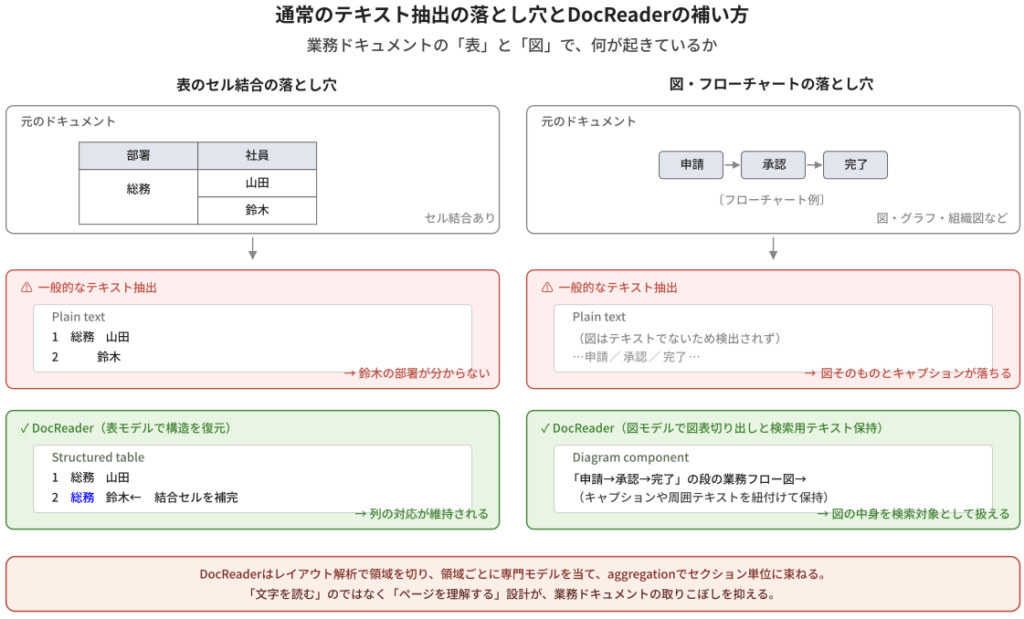
Up to this point, we've seen that "the Super RAG extraction layer uses different engines with DocReader at its core" and "handles PDFs in two separate systems,"Why is such a complex system even necessary in the first place?—You might have that question. The answer is included in the business documents.Tables and figuresIt's located there. With regular text extraction, a lot of information gets lost at this point.
Pitfalls of standard text extraction and how DocReader can compensate for them.
For example, suppose there is a table like this in part of an employee roster used in a certain business system.
| Department | Employee |
|——|——|
| General Affairs | Yamada |
| | Suzuki |
Anyone looking at it can tell at a glance that "Ms. Suzuki is also in the General Affairs Department." The cell in the "Department" column isCombine verticallyIt is written that way, and the "General Affairs" above also applies to "Suzuki" below, which is a common way of writing. However, if you simply extract this as text,
1. General Affairs: Yamada
2 Suzuki
And so,Suzuki's department is vacant.This is what happens. When the subsequent AI asks, "What department does Mr. Suzuki work in?", it can only answer, "I don't know."
DocReader treats this type of page as an image,Table ModelThe cell structure itself is restored before extraction. Cell merges are recognized as "merged," and the column correspondences are maintained when passed downstream, so the correspondence "Suzuki's department = General Affairs" is not broken when it is passed to the AI.
Another typical oversight is,Diagrams, graphs, flowcharts, system configuration diagrams, organizational chartsThese are visually easy to understand, but they contain almost no text (or only fragments),It wouldn't even be detected by a standard text extraction method.This happens quite often. Even if the text says, "Please refer to the following diagram," the diagram itself is often missing.
DocReader first processes the page image.Layout AnalysisThen, we label each area as "This is text," "This is a table," and "This is a figure." For areas identified as figures,Diagram ModelThe process involves extracting the data and, if necessary, summarizing it using LLM and keeping it as part of a chunk. This ensures that the figures themselves and their most recent captions are not excluded from the search.
In short, within business documentsTables and figures are prone to being overlooked.—This refers to the parts that have a structure other than text. Raw text conversion has a weakness in this area, and it will inevitably appear as a bottleneck somewhere in the subsequent search and answer process.
DocReader's design aims to address this weakness from the outset. It divides the content into areas using layout analysis, processes each area with specialized models (table model, diagram model, body text), and then regroups them into sections using aggregation."Understanding the page" rather than "reading the words."This difference in approach will improve the accuracy of the subsequent steps.
Documents used in business include:Paper-derived materialsThere are many such cases. These include scanned meeting minutes (including handwritten ones), order forms, invoices, and contracts, as well as faxed copies of administrative documents—materials that, while in PDF or image format, cannot have their content extracted as text.
Super RAG also uses these materialsJust add it to the folder.It is designed to be received by [this device].Scanned PDF (.pdf (File extension)Like standard PDFs, it is routed to Azure DI, where Azure DI's OCR extracts the text.Image files such as PNG and JPEGDocReader first converts it to PDF internally,PDF and common raster page processing pipelineIt merges with the existing data and processes it using layout analysis and built-in OCR. Users don't need to manually route the data, such as "it's a scan, so it goes through a different route."If you register PDFs and images in a folder, they will be processed through the appropriate route.—This simplicity is a major advantage in operation.
The OCR engine inside DocReader is designed to flexibly adapt to future environmental changes.SwitchableThe design is such that the most common options are the OCR in our currently used in-house Flax Scanner, and alternative candidates such as Azure DI's OCR and EasyOCR. Depending on the type of document (documents with good print quality, documents with poor scan quality, documents containing handwriting, etc.), the requirements for accuracy and processing costs, and the performance improvements of each model, the choice will be made.During version upgradeWe will select the most suitable OCR.Having various tuning options within the same DocReader pipeline contributes to its superior accuracy.
The extracted content (sections, tables, figures, FAQs, terminology, etc.) will be used in the final step.ChunkingAfter going through this process, it is organized into a search unit. Here again, instead of "simply breaking it down into small pieces",A special chunker is selected depending on the properties of the material.This is the design.
The main chunkers include the general-purpose ReferencesChunker, the FAQChunker which treats Q&A pairs as a single unit, the DictionaryChunker which maintains term-definition pairs, the FreeTextChunker which handles text-centric documents, the PowerPointChunker which maintains PowerPoint slides, and the PDFAttachmentsChunker for handling PDF attachments."Even with the same extraction results, the search accuracy can be further improved by changing the way the data is chunked."—This is one of the features of Super RAG.
In addition, the chunkOverlap and windowThere's also a mechanism to accommodate this. For example, if you include sections where meaning continues across chapter boundaries, slightly overlapping them with adjacent chunks, it becomes easier to answer "cross-boundary questions" in subsequent searches. Chunks that are too long become search noise, and chunks that are too short lose context—the design allows you to adjust the optimal granularity for each type of component.
I mentioned at the beginning that "extraction determines the ceiling," but to be more precise,Extraction plus chunking while preserving structure determines the ceiling of subsequent searches.Next time, we'll discuss the details of that "search" function—how it achieves a balance between meaning and words.
Up to this point, we've seen that "the Super RAG extraction layer uses different engines with DocReader at its core," "PDFs are handled in two separate systems," "tables and figures have their structure restored using a model," and "scanned PDFs go to Azure DI, and image files go to DocReader."I wonder what would happen if it were our company's business documents.You might be thinking, "What?"
to be honest,The fastest way is to try it with your own data.Yes. Super RAG offers free and paid trials, allowing you to run your actual data, perform searches and inquiries, and see how it differs from your current operations.Please contact us using the inquiry form at the end of the article. Our sales team will provide you with individual proposals.
To help you in that process, we've prepared a checklist for comparative trials that you can use in your internal review. Organizing "what to test" and "how to evaluate" will significantly improve the accuracy of your trials.
[Things to take home and consider] Checklist for comparative trials using your own data Organize "what to try" and "how to evaluate" from five perspectives.
| perspective | Things to do | deliverables | Tips |
| 1. File to be verified Comprehensive coverage of format × complexity | Format: PDF, Scan, DOCX, XLSX, PPTX Complexity: Chapter structure / Table cells / Figures / Multi-column layout Guideline: 3-5 files x 2-3 stages | File List (Format × Complexity Matrix) | Including "documents that caused difficulties with existing operations and systems" makes the effects easier to see. |
| 2. Designing search queries 4 types × 3-5 questions | Single-hop (fact-checking) Multi-hop (crossing multiple documents) Dictionary (Definition of Terms) / Strict Terms | Question list (Tagged by type) | Gathering questions that the people in charge of the business actually wanted to ask will make your argument more persuasive. |
| 3. Comparative perspective Check with 4 axes | Accuracy of extraction / Validity of search Basis for the answer / Omissions (See the difference between the existing RAG and Super RAG) | Question × RAG × 4-axis result recording sheet | The answer can be quantified by "evaluating it on an N-point scale compared to the model answer." |
| 4. Evaluation metrics Quantitative + Qualitative | Quantitative: Hit rate of the top N exemplary response criteria Qualitative: Similarity to the model answer as rated on an N-point scale by the verification team, and the user's perception of its "usability" (considering both factors makes the assessment easier). | Summary table + comments/notes | Having the person in charge of the task actually use it leads to faster consensus building. |
| 5. Trial consultation Individual proposals | The scope, duration, and number of target files are individually designed to meet business requirements. (Contact form at the end of the article) | contact (A summary of perspectives 1-4 is attached.) | Clearly defining and communicating "what you want to try" will significantly accelerate the initial design process. |
From five perspectives, each is:Tasks/Deliverables/TipsWe will focus on this point.
Perspective 1: How to select files to be verified
It is recommended to start with 3-5 files at 2-3 levels of complexity, combining comprehensive formatting (PDF text-only/scanned/DOCX/XLSX/PPTX) and complexity of content (deep chapter structure/many merged table cells/many figure captions/multi-column layout).
TipsTo avoid verification for the sake of verification, instead of blindly collecting and creating complex documents, including "documents that caused difficulties with existing Q&A systems" will make the effects much clearer.
Perspective 2: Designing Search Queries
We will divide the questions into four types (Single-hop fact-checking questions, Multi-hop questions spanning multiple documents, Dictionary questions defining terms, and precise terminology questions for model numbers and proper nouns), and prepare 3 to 5 questions for each type.
TipsGathering questions that actual business users wanted to ask the AI will make the evaluation more persuasive.
Perspective 3: Comparative Perspective
We evaluate the results on four axes: accuracy of extraction (chunk boundaries, table cells, figure captions), validity of search (are the top hits relevant?), basis for answer (are the chunks actually cited from the search hits valid?), and missed information (does Super RAG provide information that is not available in existing RAGs?).
TipsBy creating an Excel spreadsheet summarizing anticipated questions, model answers, and reasoning behind the answers, and then scoring which of the existing RAGs and the Super RAG answers are closer to the ideal, the differences between the two RAGs will become clear.
Perspective 4: Evaluation Indicators
We'll use both quantitative (citation rate of the basis for the answer) and qualitative (similarity to the model answer on an N-point scale, and whether the person in charge feels it's "usable/unusable").
TipsQualitative evaluation is, if possibleTo the person in charge of the taskHaving people physically interact with the product helps to expedite the process of reaching internal consensus.
Perspective 5: Trial consultation
The specific settings, such as scope, duration, and number of target files, will vary depending on the business requirements.Please use the contact form at the end of the article.Please feel free to contact us. Our sales team will provide suggestions tailored to your specific situation.
TipsIf you can organize and communicate in advance what you would like to try from perspectives 1-4 during the consultation, the initial trial design process will become much smoother.
The next episode (episode 5) will be:Hybrid search and reranking — Balancing "meaning" and "words"We will deliver this to you. This time, the topic was "extraction determines the ceiling of the later stages," but that ceiling isSearching is about deciding how much you can use up.is.
Specifically, they are strong at answering questions that ask, "What is the concept in essence?"Vector searchAnd, it is strong in precise terms like "model number XYZ-123".Full-text searchHow does Super RAG combine to handle both question types? Furthermore, what are the top search results?RerankWhy does the rearrangement mechanism improve accuracy? We'll look at how the material, organized through "extraction + chunking," is utilized in the search stage.
By reading the 4th (extraction) and 5th (search) together, you will understand Super RAGConsistent quality design from preprocessing to search.The outline should become visible.
Document extraction may seem like a mundane process, butThis is where we set the ceiling for the overall accuracy of RAG.This is a crucial entry point. The Super RAG extraction layer uses this entry point as its in-house document comprehension engine. DialogReader It is built around this core.Super RAG assigns the engine according to the file format.,Office files (Word/PowerPoint/Excel) and images (PNG/JPEG)It was converted to PDF internally. DocReader's raster page processing pipelinebut,.Files uploaded directly as .pdfThis is a division of labor where Azure Document Intelligence handles tasks such as standard text scanning. It's designed to preserve the structure of the data, including merged table cells and figure captions—elements often missed by ordinary text extraction—through layout analysis, table modeling, and figure modeling before passing it downstream. The OCR backend can be flexibly switched to adapt to future market changes and technological advancements.
If you're wondering "how would this work with our company's documents?",Please feel free to contact us using the inquiry form at the end of the article.You can compare the results by running your own data through free or paid trials. Please also use the checklist in the "Things to Take Home for Consideration" section at the end of this article for internal review before the trial.
<Articles in this series>