
blog cinnamon blog
[Episode 7] Super RAG API Use Case: "Document vs. Document" Search — Searching past accidents and near misses from work plans to predict hazards.
- Introduction
- About this series
- Workplace scenarios — Safety management and hazard prediction activities in manufacturing
- Why a standard RAG isn't enough — the difference between "answering questions" and "searching for documents within documents."
- Search Architecture — Custom "Document vs. Document" Pipelines
- Why does "document vs. document" search require Super RAG preprocessing?
- What does this architecture mean? — Consistency with the design decisions in Parts 2 and 6.
- Horizontal Expansion/Axis A — Other "Document vs. Document" Scenarios within Manufacturing
- Horizontal Expansion/Axis B — Trouble Search Patterns Across Industries
- Continuing the story — M's work after installing Super RAG
- [Things to take home and consider] Flowchart for inventorying "document vs. document" scenarios in your own work
- Next episode preview
- summary
Introduction
The message of this article: The normal RAG is "Enter your question → Search and refer to related documents to answer each question.It operates in the pattern of ". On the other hand, the work on site is "I want to use the document itself as input and retrieve a related set of other documents."—For example, there is a need to input tomorrow's work plan and retrieve past accident and near-miss incidents that occurred in similar tasks. This is what makes it possible."Document vs. DocumentIn the custom search pipeline of ", the foundation is Super RAG preprocessing engine and search infrastructure (structure preservation by DocReader, hybrid search, dictionary preprocessing) This can be achieved by combining these elements using APIs. In this article, we will delve deeper into this pattern, using safety management in the manufacturing industry as an example.
For example, at a manufacturing companysafety managerPlease think of Ms. M, who serves in this role. Based on the Industrial Safety and Health Act, workplaces in designated manufacturing industries with 50 or more employees are required to appoint a safety manager, and Ms. M is in that role. One of her monthly duties is:Pre-operation risk assessment for special tasks in the following monthThe process involved reviewing accident reports and near-miss incidents from the past five years, identifying similar work conditions, and sharing them at KY (Kiken Yochi - Hazard Prediction) meetings—a time-consuming process each time. It relied on the memories of veterans, partial searches by file name, and patrolling folders on the company's file server and full-text search systems. "I think that incident was similar, but where did I save it?" and "I thought this incident was similar, but actually the procedure is different." These were common occurrences.
Up to the 6th round, Super RAG Extraction (DocReader) / Hybrid Search / Answer Strategy I've been talking about how we build up accuracy using these three pillars. In this article, I'll explain how these three pillars are effective for on-site work like Ms. M's—especially for situations that can't be handled in a normal chat format.Document vs. DocumentThis article will focus on search scenarios related to "[...]".
About this series
This is the seventh article in the series. The series is structured into five chapters: (I) Why Super RAG, (II) How to implement it, (III) Visualizing the contents, (IV) What is happening in the field, and (V) Decision on implementation. Chapter III (Parts 4-6)The three pillars are extraction, search, and answer strategies.Now that all the maps are ready, we will begin Chapter IV "What is happening on the ground?Next, we will introduce how this map functions in business scenarios.
The 7th installment isThe three embedded patterns introduced in Part 2amongPattern ② (Search-focused)This is an example of a real-world case. Super RAG is "Preprocessing engine and search platform componentsIt is used as " and on top of thatWe develop our own logic for decomposing business-specific queries and integrating results.This is an architecture. The example in this article uses accident summary reports published on the internet by third parties as experimental data for a manufacturing site.Extracting accident and near-miss incidents from work plans.This explanation is based on a test implementation of the search pipeline.
Workplace scenarios — Safety management and hazard prediction activities in manufacturing
In manufacturing establishments,KY activities (hazard prediction activities)orTBM (Toolbox Meeting)Risk assessments like the one described above are conducted on a daily basis before any work begins. The cycle involves identifying potential hazards in tomorrow's or today's work in advance, sharing countermeasures, and then starting the work.
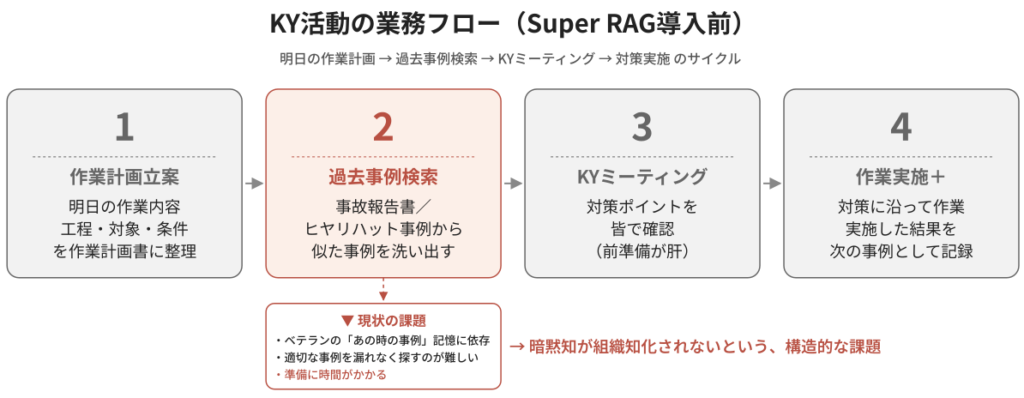
Workflow for KY (Kiken Yochi - Hazard Prediction) activities (Before)
At the core of this cycle is,Reference to past accident reports and near-miss incidents.is.
- Without even needing to invoke Heinrich's Law, what happens on the ground isClose callSuch incidents have been accumulated in large numbers as precursors to serious accidents.
- In past similar tasks, what accidents or near misses occurred, what were the causes, and what countermeasures should be taken—these are all things that are important within the organization.experienceIt is recorded as "
- In the KY meeting, we will draw out this experienceLet's all review the key points to keep in mind for today's work.That is the purpose.
But what is the reality on the ground?Past accident reports and near-miss reports are indeed kept as records.In many cases, this data is stored on the company's internal file server in an unstructured state.The problem is that it's difficult to access when you need it.That's the point.
- Even if you search by file name,The file name is a business-like name such as "20230815_Accident Report_Manufacturing Department 2.docx".And it doesn't show the contents.
- Even when categorized into folders, they are organized along departmental or formatal axes, such as "Manufacturing Department 2 Folder" or "Maintenance Case Studies Folder.""Examples under the same working conditions" cannot be used as a reference.
- in the end,A veteran's memory: "That case from back then was similar, wasn't it?"This leads to relying on others, and the knowledge is not internalized within the organization.
In places where skilled labor is required, such as chemical plants,These sounds and smells are signs of something wrong.”, “Always check for insulated gloves in this situation."such asTacit knowledgeHowever, a structural problem has been pointed out: this knowledge is only accumulated in the minds of veterans. The reason why Ms. M spends time identifying cases is ultimatelyThe process of transforming this tacit knowledge into organizational knowledge, all by one person.That's how it was.
Why a standard RAG isn't enough — the difference between "answering questions" and "searching for documents within documents."
Here, we will introduce the following in the first to sixth installments.Regular RAGPlease recall how to use "".Enter a question in natural language.The AI then extracts the relevant section from the related documents.Answer in a question-and-answer format.Returning this—this is the basic pattern for a chat-style RAG.
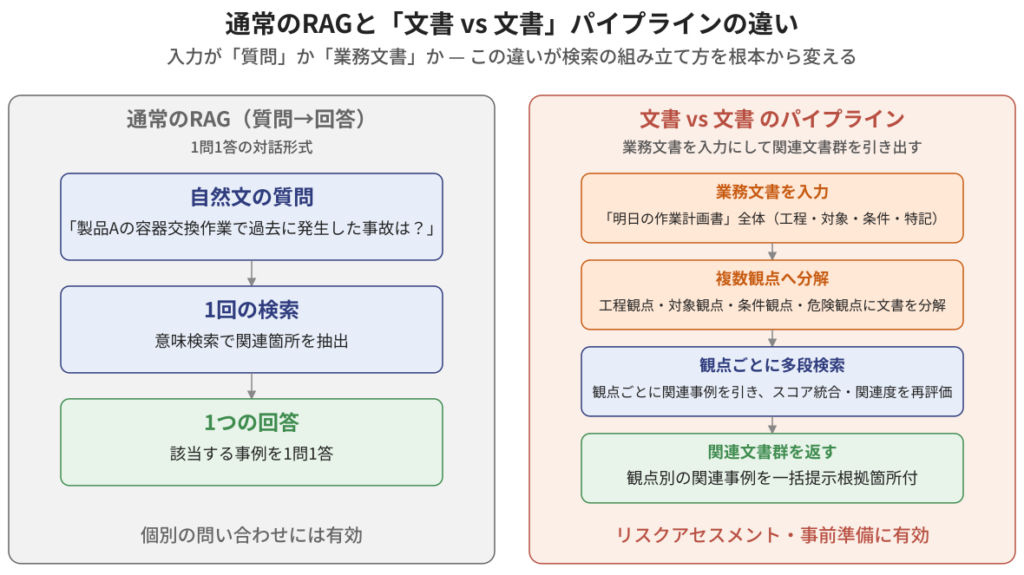
"Answering Questions" RAG vs. "Document vs. Document" Pipeline
Applying this to Ms. M's work, it would look like this.
- If you ask, "What accidents have occurred in the past during the container replacement process for product A?", you can retrieve relevant accident examples.
- If you ask, "Tell me about some near-miss incidents involving working at heights during the nighttime hours," you'll likely find some plausible examples.
This is certainly convenient.However, the real need for the work is to "identify relevant examples without overlooking any perspectives for the entire task of tomorrow."That's the thing. Tomorrow's work plan is packed with multiple processes, multiple target equipment, multiple working conditions, and multiple hazard perspectives.1 question 1 answerSo, if you ask them in order,
- "What are some examples related to process X?"
- "What are some examples related to process Y?"
- "What are some examples of how to use Equipment A?"
- "What are some examples of nighttime work?"
- "What are some examples in situations like XX?"
—And so, you need to repeat the question many times.Leaks will occur, and if you consider combinations of perspectives (process X × nighttime × equipment A), the number of combinations will explode..Also,The answers to each question are patched together from different reports, resulting in inconsistent solutions.It's possible.
Now, let's change our perspective.Instead of constructing a question, use tomorrow's work plan (document) itself as the starting point for your search.Therefore, the work plan already contains the process, target, conditions, and anticipated hazards.It mechanically breaks it down, retrieves past examples from each perspective, and returns them all together.—This is "Document vs. DocumentThis is a custom search for "[...]".
To summarize the differences from the regular RAG, it's as follows:
| perspective | Standard RAG (Question → Answer) | Document vs. Document pipeline |
|---|---|---|
| input | Questions in natural language | Business documents (work plans, etc.) |
| Input Interpretation | Search by meaning of a single question | DocumentMultiple perspectivesDecompose into |
| search | 1 search | Each perspectiveMulti-stage search |
| output | One answer | Different perspectivesRelated Documents |
| Suitable tasks | Individual inquiries | Risk assessment and preparation |
"The question is in writing.This difference fundamentally changes how you structure your search.The system analyzes input documents, breaks them down into different perspectives, constructs searches for each perspective, and integrates the results.—This series of processes constitutes the "document vs. document" search pipeline.
Search Architecture — Custom "Document vs. Document" Pipelines
I will draw a typical pipeline that applies to Ms. M's work.
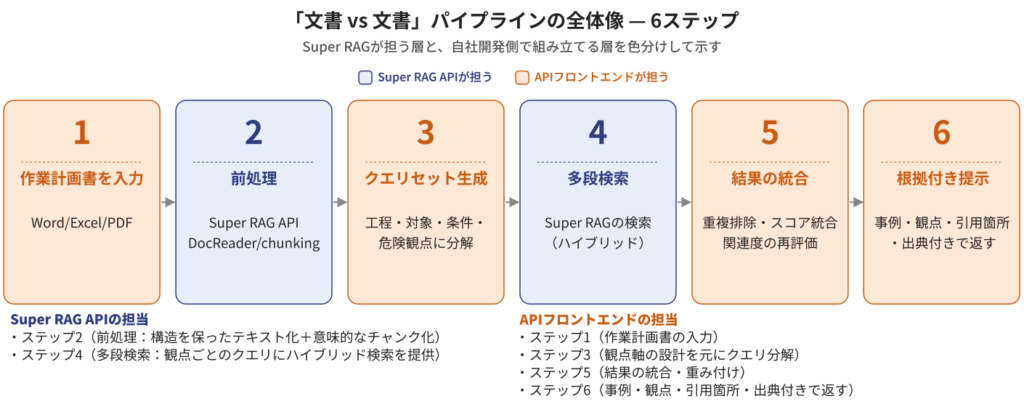
The overall picture of the "document vs. document" pipeline.
Step 1: Enter the work plan. Users submit their work plan for the next day (Word/Excel/PDF, etc.) to the system. For example,November 15th, late night shift, manufacturing line AA, container replacement work for product B, 3 workers, tools used: chain hoist, special note: scaffolding was damp.This is a business document like the one shown.
Step 2: Preprocessing (Super RAG API) Super RAG preprocesses the entered work plan. Specifically,
- POST /api/v3.3/actions/document-extract/Text conversion while preserving structure(DocReader)
- POST /api/v3.3/actions/chunking/Division into meaningful units
At this point, the work plan is structured as a collection of sections such as "Process Schedule," "Condition Description," and "Special Notes."Units that machines can handleIt will be organized as follows.
Step 3: Queryset generation (the process of assembling it on the API frontend) This is the "document vs. document" pipeline.Responsibilities of the API frontendThat's it. From the pre-processed work plan,We construct search queries based on different perspectives.In terms of safety management, typical perspectives include the following:
- Process perspective"Container replacement work," "Work using chain hoists"
- Target perspective"Manufacturing Line AA" "Handling of Product B"
- Conditional perspective"Nighttime work," "Wet scaffolding environment," "Three-person team"
- Risk perspective"Risk of falling," "Risk of exposure to heat and chemicals," "Risk of reduced visibility"
These are each a set of independent search queries.The perspective and axis are determined by the specific task.Therefore, this is set via the prompt.
Step 4: Multi-stage search (calling a Super RAG search) The assembled queries for each perspective are sent to the Super RAG search endpoint (POST /api/v3/workflows/retrieve/). The search targets are folders containing past accident reports and near-miss incidents. For each perspective, a list of document fragments is returned in order of relevance.
Here, we introduced in the fifth installmentHybrid search (based on both meaning and word)This works.The scaffolding is wet.Situational descriptions (more semantic) like this and "Manufacturing line AAEven in searches that include both proper nouns (word-like terms) such as "[...]", running both axes simultaneously reduces the chances of missing results.
Step 5: Integrating Results (The process of assembling them on the API frontend) The examples that came back from each perspective,Duplicate removal, score consolidation, and re-evaluation of relevance.Integrating with,Final reference case file listThis is how it is presented to users. If the same case is relevant from multiple perspectives, it can be weighted here to be placed higher as a particularly important case.
Step 6: Present with evidence The final result is,Case title, related perspectives, quoted section from the original document, source.It will be presented along with this. At the KY meeting, Ms. M said,This case was a hit from both a process and a conditions perspective. The original accident report can be found here.You can share it with supporting evidence, like this:
This pipelineThe part that Super RAG is responsible forThis involves preprocessing in step 2 and searching in step 4.The part handled by the API frontendThis involves step 1 data input, step 3 query decomposition, step 5 integration, and step 6 result display. Super RAG is "partsThis involves incorporating it as a search engine and building a business-specific search flow in-house—this is the structure of Pattern ② (search-focused).
📺 Demo videoYou can see how the pipeline described so far actually works in this video. It's a demo application built using the Super RAG API.The entire process from uploading a work plan to the presentation of related case studies., andAccuracy measurement using LLM rerank (Hit@1: 84.6%)You can check everything up to this point.
The video shows you four screens in order: defining relevance, setting up search parameters, measuring accuracy, and actually executing a search. This is an experimental implementation of the API frontend by our company. While the article focuses on explaining the concepts, the video also includes specific numerical data (such as running searches with a maximum of 8 chunks, and accuracy improvement from 69.2% before reranking to 84.6% after reranking).
Why does "document vs. document" search require Super RAG preprocessing?
Here, I will explain the core differentiating factor of this article. Custom search for "document vs. document" is...Both the input document and the search target document are business documents.The point is a major feature. And both areJapanese + complex layout + tables + diagrams" is mixed in,Pre-processing is difficult.These are the materials.
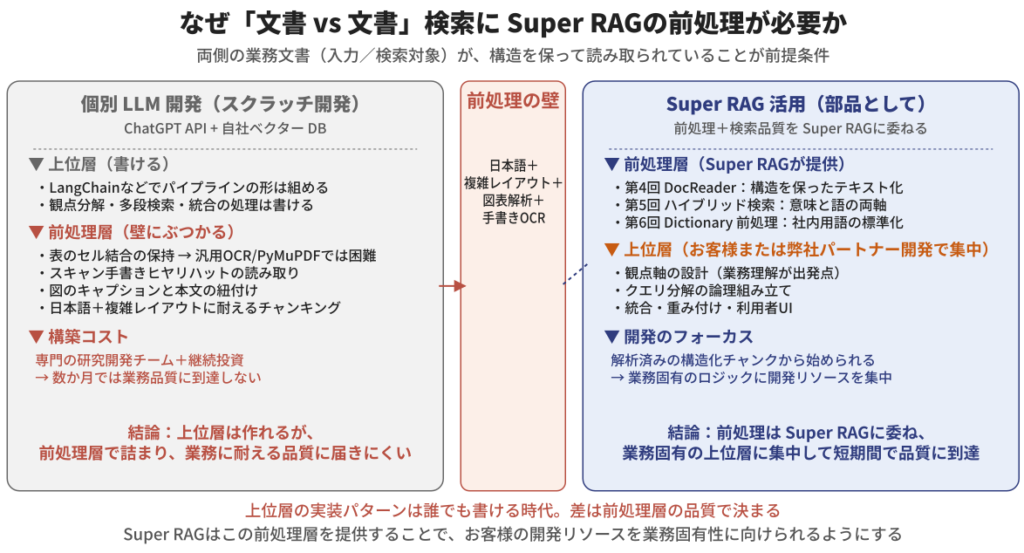
Why document vs. document search relies on Super RAG preprocessing.
Contents of the input side (work plan)
A work plan may look simple, but its content is surprisingly multi-layered.
- process chartA table listing the steps of the work in order (Step 1, Step 2, ...). Cell merging may be used to list "Tools Used" across multiple steps.
- Table of working conditionsThe date, time, location, person in charge, and any special notes are written in a table format.
- Equipment diagrams and work area diagrams: Drawings of the equipment to be worked on and a floor plan showing the work area are attached.
- Main textNotes, special information, and reference information are written in text.
These areIt cannot be read in meaningful units." and Step 3's perspective decomposition cannot be performed. The merged cells in the table break down, the correspondence between "Tools Used" and "Procedure" is broken, and the figure caption ("Figure 1: Working areaIf something like this is separated from the text or chunked in an inappropriate location,Extraction will no longer be possible along the perspective axis..
Content of the search target (accident reports, near misses)
The search criteria themselves are just as complex.
- Section structure of the accident reportThe chapter structure is often fixed, including sections such as "Accident Overview," "Circumstances of Occurrence," "Direct Cause," "Root Cause," "Corrective Measures," and "Measures to Prevent Recurrence."
- On-site photos and diagramsThis includes photographs of the accident scene, diagrams illustrating the extent of the damage, and flowcharts of the work procedures.
- Table of damage status: Damaged parts, extent, and repair costs are organized in a table format.
- Handwritten elements: A scanned handwritten document containing a near-miss report filled out on-site.
TheseThe structure is preserved while being included in the search.This is the premise for finding "similar cases that occurred under the same working conditions." For example,The accident occurred during container replacement work, and the root cause was moisture on the scaffolding.When you want to search using a combination of conditions like this, if the section structure is broken, the search will mix all the text together, and the results will be buried in noise.
The three pillars of the 4th to 6th installments support the document quality on both sides.
Here, the three pillars of Super RAG that we introduced in parts 4-6 come into play as the foundation supporting the document quality on both sides.
- Part 4 (Structure preservation using DocReader)Table cell merging, figure captions, chapter structure—because these remain intact, both the input work plan and the searchable accident report are preserved.Both can be mapped at the same granularity.
- Fifth installment (Hybrid Search)Even for search queries that mix both "wet scaffolding" (meaning-focused) and "manufacturing line AA" (word-focused), Super RAG can handle both axes with a single call.
- 6th installment (Dictionary preprocessing)Internal company terminology and industry jargon such as "Line AA," "TBM," "KYT," and "PRTR substances" are standardized in a glossary before being searchable.
In other words, custom searches for "document vs. document" are:It won't work if the in-house development team simply handles query decomposition and integration..Both documents have been pre-processed to a high quality.The premise is that Super RAG provides the pre-processing layer for that purpose.
Differentiation from individual LLM development
To be frank,By combining the OpenAI GPT API with your own vector database, you can create the basic structure of a search pipeline.Frameworks like LangChain allow you to write code for perspective decomposition, multi-stage search, and integration. The implementation patterns themselves are now something anyone can write.
However, when trying to create a search pipeline that works in the field,I'm stuck on implementing the preprocessing layer..
- Reading data while preserving merged cells in a table is difficult for general-purpose OCR and PyMuPDF.
- Converting handwritten near-miss reports from scanned PDFs into text and chunking them is a very difficult process to implement from scratch.
- Maintaining the link between figure captions and the text requires accurate layout analysis.
- Building a pre-processing engine for business documents that handle "Japanese language + complex layout + tables + diagrams + handwritten elements" in-house with sufficient quality for business use, and then continuing to maintain it afterward, is...Specialized team and ongoing investmentRequired
Super RAG is thisProviding a preprocessing layer and a search infrastructure.So, the customer is searching for "document vs. document".You can focus on the higher layers (query decomposition, perspective design, and integration).Making it so—this is a clear distinction from individual LLM development.
Furthermore, Super RAG publishes its specifications in OpenAPI format (JSON file), and if it is loaded into a coding agent (AI-based development support) that has become popular in recent years,HumansYou can build business-specific custom pipelines in a short amount of time without needing to understand the API in detail.This is well-suited to a modern development style. The demo application in this article was also built in just about three days by combining the Streamlit and Super RAG APIs. The philosophy of Pattern ②, which involves "using Super RAG as a component and assembling business-specific features in-house," is well-suited to this kind of rapid development.
What does this architecture mean? — Consistency with the design decisions in Parts 2 and 6.
Here, we'll tie up the loose ends from the series.
Full-scale utilization of Pattern ② (Search-focused)
In the second installment, when we introduced the "three embedded patterns," pattern ② was "Preprocessing and search are handled by Super RAG, while higher-level orchestration is done in-house.He introduced it by saying, "This case is exactlyFull-scale application of pattern ②And furtherWe control the decomposition and integration logic of business-specific queries.This enables "document vs. document" searching.
In the second installment, we illustrated the expense review process for Dify integration as a representative example of pattern ②.Even with the same pattern ②, there are multiple options for how to construct the higher-level orchestration.Using a general-purpose workflow platform like Dify, or, as in this case study...Build business-specific search logic using our own code.Both forms are included in pattern ②. In cases where the process is highly specific to the task, the latter is easier to optimize for the task.
The sixth division of labor design and alignment
In the 6th installment,Multi-hop inference orchestration is a division of labor with the agent-based architecture.The idea put forward as "" is, in this case, "Orchestration of custom searchThis is how it appears: Super RAG provides knowledge source understanding and search quality, while the in-house development team handles the decomposition and integration of business-specific queries.
In the sixth installment, we cited "agent-based infrastructure such as Dify for multi-hop needs" as an example.In the demo, we built a general-purpose pipeline, but ideally, we want to inject business-specific details to optimize it.This is a domain. The "design of perspective axes," "logic of query decomposition," and "weighting of integration" are unique to each business, and accuracy can be further improved by optimizing at the code level, not just by adjusting prompts. In this case, a method of building the search logic with a coding agent is suitable. Even within the same pattern ②, the choice is between using Dify, which is more stable and visible, or prioritizing the efficiency and flexibility of the coding agent and building a custom logic, even if it reduces visibility.High degree of job specificityYou should choose based on that.
If your company lacks an in-house development team or requires specialized knowledge for search pipeline design, you can choose to collaborate with a Cinnamon AI partner for design and implementation. More details will be provided in a later article, but if you are interested, please feel free to contact us using the inquiry form at the bottom of the page.
Horizontal Expansion/Axis A — Other "Document vs. Document" Scenarios within Manufacturing
The "document vs. document" pipeline isn't limited to KY (Kiken Yochi - Hazard Prediction) activities.Even if you only look at the manufacturing industryThere are many tasks that can be designed using the same pattern.
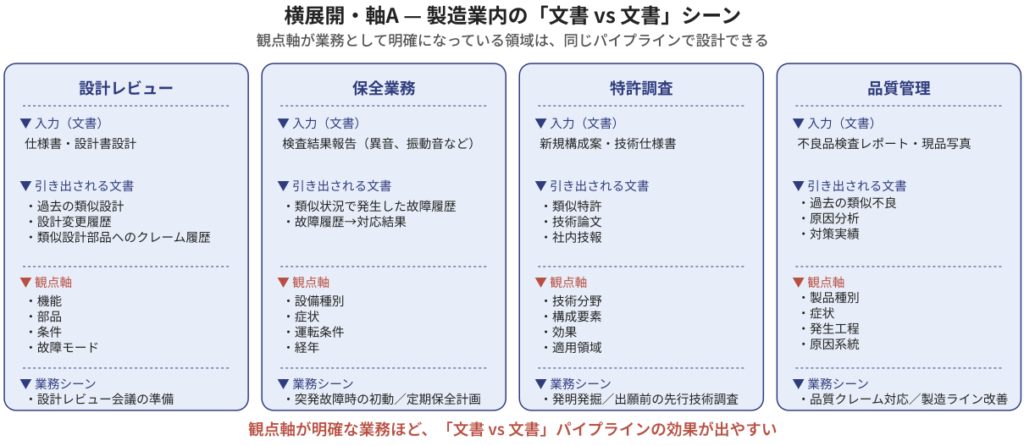
Proposed methods for utilizing "document vs. document" within the manufacturing industry.
Design Review
In design reviews for new products and new equipment,Design drawings, specifications, and FMEA (Failure Mode and Effects Analysis) reports.Enter this as input.Past trouble cases with similar designs, design change history, and parts recall information.There is a need to extract this. The perspective axis is "Functions, components, conditions, and failure modesFor example, it can be used to ensure that designers and reviewers thoroughly review past cases when preparing for design review meetings.
Maintenance work
Using signs of equipment failure (such as abnormal vibration noises) obtained from daily inspections as input,Past similar failure cases, repair procedures, and replacement parts informationThere is a need to extract this. The perspective axis is "Equipment type, symptoms, operating conditions, ageThese are used for initial response to sudden breakdowns and for preliminary planning of regular maintenance schedules.
Patent search
Enter the proposed configuration and technical specifications for the newly developed system.Past similar patents, technical papers, and internal technical reportsThere is a need to extract this. The perspective axis is "Technical fields, components, effects, and application areasThese are used for invention discovery and prior art searches before filing a patent application. Pre-processing that allows you to read patent drawings (flowcharts, structural diagrams) is also effective here.
quality control
Input the inspection report of the defective product, the actual product photos, the analysis data of the defective sample, etc.Past similar failure cases, cause analysis reports, and countermeasures.There is a need to extract this. The perspective axis is "Product type, symptoms, process of occurrence, causal chainThese are examples of how they are used in handling quality complaints and in improving manufacturing lines.
The more clearly defined the perspective and framework of a task, the more likely it is to benefit from a pipeline.
What these manufacturing scenarios have in common isThe perspective and framework are clearly defined as part of the work.For example, design reviews focus on "functions, components, and failure modes," maintenance work focuses on "equipment type, symptoms, and operating conditions," and quality control focuses on "product type, symptoms, and process of occurrence."The axis of disassembly that veterans use in their mindsHowever, the more a task can be articulated as operational know-how, the easier it is to create a "document vs. document" pipeline.
Conversely, the first step in designing a "document vs. document" pipeline is:Interview the person in charge of the work to extract their perspective.That's the point. Understanding the business operations is the starting point, before getting into technical details.
Horizontal Expansion/Axis B — Trouble Search Patterns Across Industries
The "document vs. document" pattern extends beyond manufacturing.Cross-industry "troubleshooting" patternsIt can also be viewed as such.
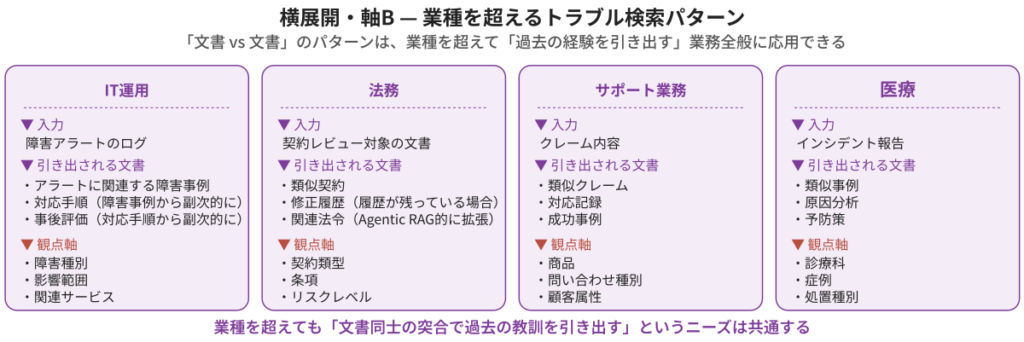
Cross-industry troubleshooting patterns
Let's take a quick overview.
- ITOperation: Log of incident alerts → Past similar incidents and response procedures, post-incident evaluation
- LegalDocuments subject to contract review → Past similar contracts, revision history, and relevant laws and regulations
- Support work (call center, etc.)Complaint details → Past similar complaints and response records/success stories
- medical careToday's incident report → Past similar cases, cause analysis, and preventive measures
both,"I want to retrieve other related documents based on a specific business document.This is the pattern. Even if the industries are different,At the core of our work is the need to "extract past experiences as organizational knowledge."As long as it's within the same "document vs. document" pipeline, it can be designed.
What's important here is,The perspective changes depending on the industry.For example, in IT operations, it would be "type of failure, scope of impact, and related services"; in legal matters, it would be "contract type, clauses, and risk level"; and in call centers, it would be "product, inquiry type, and customer attributes"—and so on.Understanding the business is the starting point.The resulting composition is the same as the manufacturing scene in Axis A.
Continuing the story — M's work after installing Super RAG
Let's return to the work of Ms. M, who was introduced at the beginning. After implementing Super RAG in the Pattern ② configuration, how will Ms. M's monthly work change?
The preparation for the pre-risk assessment, which had previously taken a lot of time,Significantly shortenedIt will be done. When you enter tomorrow's work plan,List of related case studies organized by perspectiveHowever, the response comes back with supporting evidence. Ms. M reviews it visually and then prepares it as material for the KY meeting—that's the current process.
The content of the KY meeting has also changed. The part that used to rely on the veterans' memories has changed.Referencing past cases as an organizationThis change allows everyone, including new employees, to discuss things from the same premise.This case is similar to one that happened three years ago."The countermeasures at that time were written as follows:This kind of exchange proceeds with supporting evidence. You'll also find examples that serve as the basis for the veteran's advice.
And Ms. M was also able to reallocate her own work time. She was able to use the half day she had been spending searching for case studies.Review of business process improvements, training of new employees, on-site inspections.such as,Higher value-added activitiesIt will be redirected to this. This is because AIReplacing peoplerather thanPeople can focus on more essential work.This is one form of modern AI utilization, aiming to achieve this goal.
Furthermore, at the meeting,What were the final improvements made to the measures taken in this case?”, “What aspects did you use as evidence to determine that they were highly relevant?There is also a scene where M asks additional questions to Super RAG in a dialogue format. What is important here is,You can first narrow down similar cases and "fix the document," and then repeatedly ask questions about that fixed document.This is the point. In a typical RAG, the documents referenced change every time the question is changed, making consistent analysis difficult, but in this pipeline...Based on a carefully selected set of case studies, we will delve into the causes, preventive measures, and the effectiveness of countermeasures from multiple perspectives.This is possible. This is what we introduced in the 6th installment.Simple multi-stage inference that can be covered by repeating single-hop stepsThis shows how it's being used in document-fixed mode. Here we see how pre-risk assessment and additional questions using document-fixed mode are being effectively combined in practice.
[Things to take home and consider] Inventory of "document vs. document" scenarios in your own workflow
Thank you for reading this far,Are there similar situations in our work where we have to "search for documents within documents"?You might be thinking, "How do I figure that out?" We've prepared a simple sheet to help you get a better idea.
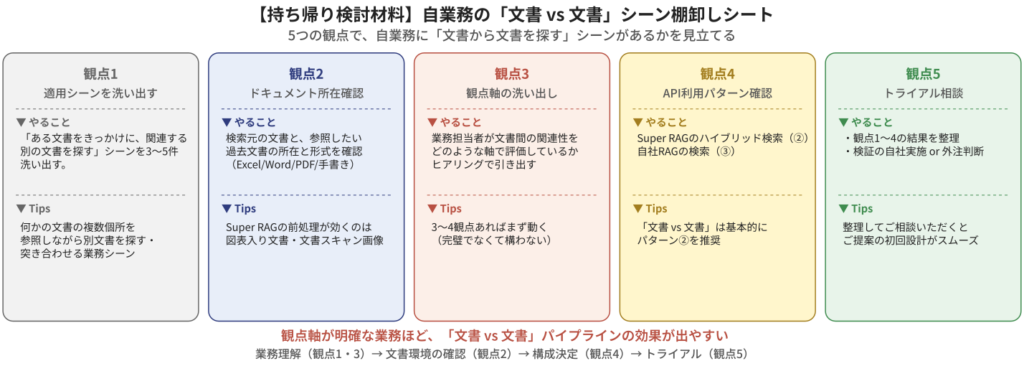
Inventory sheet for "document vs. document" scenarios in your own work
From five perspectives, each is:Tasks/Deliverables/TipsWe will focus on this point.
Perspective 1: Identify "document → document" scenarios.
In my work,Using one document as a starting point, search for other related documents.We will identify 3 to 5 such scenes. These include the KY activities, design reviews, quality control, and maintenance work introduced in this article.Searching for and cross-referencing information in multiple parts of one document with information from another document.Look for the work scenes.Tips"What the veteran is thinking in that sceneObserving this will make the scene easier to visualize.
Perspective 2: Location and format of reference documents
Past documents that you want to refer to in each scene (accident reports, past projects, design review records, claim handling records, etc.)Where and in what format is it saved?We will check.TipsUnderstanding the proportions of Excel, Word, PDF, scanned PDF, and handwritten documents will help identify areas where Super RAG preprocessing is particularly effective (complex layouts, scanned documents, and handwritten documents).
Perspective 3: Identifying the perspective axes
In each sceneThe axis of alignment that the person in charge of the business uses in their mindWe will extract this information through business interviews.
- KY (Hazard Prediction) Activities → Process, Target, Conditions, and Hazard Perspectives
- Design Review → Function, Components, Conditions, Failure Modes
- Quality control → Product, symptoms, process, cause chain
- Maintenance work → Equipment type, symptoms, operating conditions, age
The clearer the perspective and framework of a task, the more likely it is to benefit from a "document vs. document" pipeline.—This is one of the key messages of this article.TipsThe perspective axis doesn't need to be perfect.With 3-4 axes, it will almost certainly work..
Perspective 4: Confirmation of API usage patterns
We will now decide which of the three built-in patterns introduced in the second installment will be used for implementation.
- Pattern ① (Super RAG center): When it is sufficient to be able to make inquiries using the standard UI in an interactive format.
- Pattern ② (Search-focused): If you want to build business-specific orchestration on top of Super RAG preprocessing and searching using a workflow platform such as Dify or your own code (The example in this article is here.)
- Pattern 3 (Specialized for pre-processing): For cases where you want to use Super RAG for preprocessing only and complete everything in-house, from vector database to search infrastructure and inference.
TipsThe "document vs. document" scenario basically falls under pattern ②. Both using a general-purpose workflow platform like Dify and building it with your own code, as described in this article, are within pattern ②. However, if you use your own infrastructure (vector DB storage, search, and inference), it can also be achieved with pattern ③. You should choose between ② and ③ depending on the degree of business specificity.
Perspective 5: Consultation on verification during the trial.
Once the inventory is complete, it's essential to verify whether you can actually use the Super RAG API with real data to perform document searches that suit your business needs. Specific parameters such as scope, duration, and number of target files will vary depending on your business requirements. While it's possible to implement this in-house using a coding agent, if that proves difficult, we also offer the option of assisting you with a free or paid Proof of Concept (PoC).Please use the contact form at the end of the article.Please feel free to contact us for advice.TipsIf you could summarize and share the results from perspectives 1-4, it would greatly streamline the process of designing what to test in the initial trial.
Next episode preview
Next time (Episode 8),Use Case Example 2: Support/FAQ/Glossary ManagementThis article will cover the world of custom search pipelines specific to your business, specifically "document vs. document" searches. Next time, we'll shift our perspective and...Development and operation of FAQs and glossaries that can be used for handling inquiries in support operations.This article will address how to organize the large volume of documents generated daily for inquiries using a Super RAG (One Paper, One Telegraph) approach.
especially,A system for semi-automatically generating FAQ data from existing document sets.or,Maintain an internal glossary to maximize the effectiveness of dictionary preprocessing.This article is a counterpart to the one presented in the sixth installment, as it provides a practical application of the dictionary preprocessing techniques introduced in the first installment.
summary
A regular RAG is "For each natural language question, answer one question at a time using relevant documents.The main pattern is ". On the other hand, the work on site is "I want to use a certain business document as input and retrieve a related set of documents."—Extracting past accidents and near misses from tomorrow's work plan, extracting past trouble cases from design drawings, extracting similar past defects from defective product inspection reports—"Document vs. DocumentThere is a high demand for "[this]".
The solution to this is the "Document vs. Document Custom Search PipelineThat was it. For the full-scale implementation of Pattern ② (search-focused), which we introduced in the second installment, Super RAG will handle preprocessing and the search infrastructure, while the business-specific query decomposition and integration will be assembled by our in-house development team.
The premise for this pipeline to work is,Both the input documents and the accident reports and past case studies being searched maintain their structure of "Japanese + complex layout + tables + diagrams" and are readable.This is where the three pillars of Super RAG—structure preservation using DocReader in the fourth session, hybrid search in the fifth session, and dictionary preprocessing in the sixth session—come together and become effective.
Within the manufacturing industry, it has the potential to be widely applied to tasks with clearly defined perspectives, such as KY activities, design reviews, maintenance work, patent searches, and quality control. Furthermore, it can be applied across industries, including IT operations, legal affairs, call centers, and healthcare.Searching for documents within documentsThe same pipeline can be applied to all aspects of your work. If you think, "There might be similar 'document vs. document' scenarios in our work," please consider the five perspectives outlined in this article for further consideration. If you would like to verify this with actual data,Please feel free to contact us using the inquiry form at the end of the article.With free and paid trials, you can verify the preprocessing quality and search accuracy of Super RAG using your own data.
<Articles in this series>
- [Part 1] Achieving a Quality Beyond Standard RAG — Technical Innovations Supporting Super RAG
- [Part 2] A Thorough Explanation of Three Embedded Patterns — Analyzing API Call Flows and Dify Expense Review
- [Part 3] API Function Catalog — What can be done, and what should be handled in-house?
- [Part 4] The Contents of Document Extraction — How is the Engine Selected?
- [Part 5] Hybrid Search and Reranking — Making the Most of Extracted Content by Balancing "Meaning" and "Words"
- [Part 6] Super RAG Answer Strategy — Design Decisions for Mastering Single-hop Answers and 3 Techniques to Support Answer Quality
- [Episode 7] Super RAG API Use Case: "Document vs. Document" Search — Searching past accidents and near misses from work plans to predict hazards (Scheduled for release in August 2026)