technology
In the previous article, we introduced the overall picture of Super RAG and three integration patterns via the API (① Super RAG-centric / ② search-focused / ③ pre-processing-focused). The pattern is determined by the boundary point of "how much to entrust to Super RAG and how much to control in-house."
This time, we'll take it a step further.What is the actual API call flow for each pattern?,andWhich pattern should our company's project choose?This article explains the process. The choice of pattern directly impacts the allocation of development resources, how existing assets are utilized, and future expansion potential. In the latter half, we will use the expense review workflow combined with Dify in Pattern ② as a concrete example and delve into "why this combination works." At the end of the article, we have prepared a "Table for Determining Which Pattern to Choose" as a reference for architectural considerations. It is designed to be used directly when discussing your company's RAG integration policy.
This is the second article in the series. The series is structured into five chapters: (I) Why Super RAG, (II) How to implement it, (III) Visualizing the contents, (IV) What's happening in the field, and (V) Decision-making regarding implementation. This article covers the first half of Chapter II, "How to implement it," and the next article (the third in the series) will be a "catalog" that organizes the API functions themselves by function.
To review what we covered last time, let's look at the three patterns from the perspectives of "who is responsible for what" and "the granularity of the APIs used."
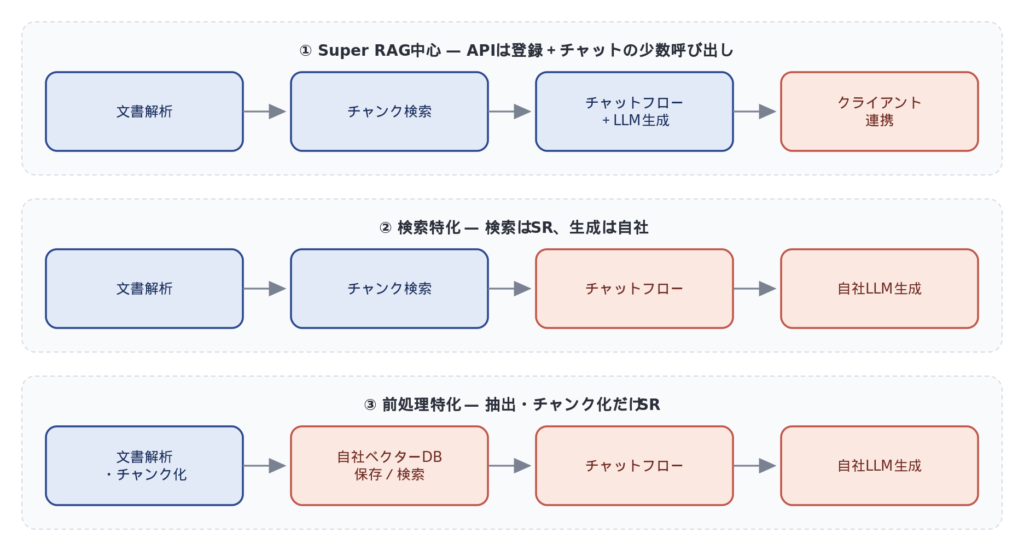
| pattern | Document analysis | Chunk search | Answer generation | Granularity of API usage |
|---|---|---|---|---|
| ① Mainly Super RAG | Super RAG | Super RAG | Super RAG (including LLM) | Large (registration + chat) |
| ② Search-focused | Super RAG | Super RAG | Our own LLM | Medium (Registration + Search + Self-Generated) |
| ③ Specialized in pre-processing | Super RAG | Our company | Our own LLM | Detailed (extraction, chunking, and embedding using each API) |
What I'd like you to pay attention to here is,"Use 'purpose-oriented APIs' that process at a larger granularity the closer you are to Super RAG, and use 'function-oriented APIs' that process at a finer level the closer you are to your own company."This is the general trend. This is not simply a matter of effort, but a trade-off with the degree of control at each stage. In patterns where a degree of flexibility is desired, the number of functional API calls increases, while in situations where simplicity is desired, purpose-oriented API calls that do not require fine-grained control suffice.
Next, we will look at the API call flow in detail for each pattern.
Pattern 1 is a configuration where the entire process, from document registration to response generation, is fully delegated to Super RAG. The company's own system plays only the minimal role of uploading files and sending chat messages.
APICall flow (typical example)
1. Upload the target document using POST /api/v3.2/collections/{collection_id}/references/
2. The Super RAG side automatically performs extraction, chunking, and indexing.
3. Create a chat session using POST /api/v3.2/chats/
4. Send your question via POST /api/v3.2/chats/{chat_id}/messages/
5. Answers, evidence, and reference chunks are streamed via SSE.
Suitable cases
This is a case where there is no existing RAG infrastructure and the company wants to deploy AI assistant functionality internally as quickly as possible. Because design, implementation, and operation can be minimized, the time from PoC to production will be the shortest possible.
Points to note
With Super RAG, there are some limitations in fine-tuning the prompts ultimately sent to the LLM, replacing the LLM itself, and strictly controlling the response format. If you want to fine-tune the LLM's input and output yourself, you might want to consider Pattern ②.
Pattern ② utilizes Super RAG's powerful document analysis and search capabilities while controlling response generation (final prompt synthesis, context management, LLM call) on-site. This is a hybrid approach where searching is handled externally and response generation is done internally.
APICall flow (typical example)
1. Upload the document using POST /api/v3.2/collections/{collection_id}/references/
2. The system receives the query and retrieves the relevant chunks using POST /api/v3/workflows/retrieve/.
3. Assemble the acquired chunks into prompts on our end.
4. Generate responses using your company's preferred LLM (OpenAI/Azure/on-premise LLM, etc.).
Suitable cases
This is a case where the company already has an LLM calling infrastructure and a workflow control mechanism (similar to Dify, which will be discussed later). This configuration is well-suited to requirements where the company wants to control the response format, prompt tuning, and model switching in-house.
Dify expense review falls into this position.
As we will discuss in more detail later, a typical example of pattern ② is a configuration where Dify's workflow calls /api/v3/workflows/retrieve/ to retrieve relevant regulations, and a Dify agent then makes a review decision.
Pattern 3 uses Super RAG exclusively for document analysis (extraction, chunking, and embedding as needed), with vector database construction, searching, and response generation all controlled internally.
APICall flow (typical example)
1. Extract structured text from a file using POST /api/v3.3/actions/document-extract/
2. Split the extracted text into chunks using POST /api/v3.3/actions/chunking/
3. (Optional) Vectorize the chunks using POST /api/v3/actions/embedding/. If using your own embedding model, perform this step yourself.
4. Store chunks and embeddings in our own vector database.
5. When a question is asked, the company performs a vector search → constructs a prompt → generates the answer using its own LLM (Low-Level Module).
Suitable cases
We have developed our own vector databases (Milvus, Qdrant, Pinecone, etc.) and search pipelines, and we want to maintain the flexibility of their search and inference capabilities.Only the part that extracts the structure of diverse documents, including Japanese, with high accuracy.This is a case where we want to entrust this to Super RAG. The accuracy of the preprocessing determines the ceiling of the final search and answer accuracy, so entrusting this to an external engine is a realistic option.
Points to note
This approach offers the broadest implementation scope, from index building to query processing. However, it allows you to control every parameter yourself, including chunk granularity, vector dimension, and whether or not reranking is enabled.
From here, we will present the most easily understandable concrete example of pattern ②.Expense review workflow using DifyWe will discuss this.
Expense review may seem like a simple matching task at first glance, but in reality, it involves multiple sources of information.
- Reading the application details (subject, amount, payee, etc.)
- Comparison with internal expense regulations
- Assignment of accounting account codes
- External information when a decision cannot be made based on regulations (e.g., National Tax Agency guidelines, verification of the existence of the recipient of payment)
- A decision on whether or not to do something, based on supporting evidence.
If you try to complete this process using only Dify, internal documents (Word, Excel, forms)High-precision readingThis is where we run into problems. Dify's standard RAG is a simple, text-centric search, which tends to miss information in table cells and formatted standard documents. Also, creating custom pipelines with the Knowledge Pipeline feature requires a lot of effort and tends to be data-dependent, making it difficult to create general-purpose, high-precision pipelines.
On the other hand, even if you try to complete the process using only Super RAG,Referencing external web information and controlling the flow of the review processThis is where it falls short, making agent-based multi-stage inference difficult. In other words, in themes requiring multi-stage inference, the strengths of both are complementary. By combining Dify's "flexible workflow control and agent functionality" with Super RAG's "high-precision Japanese document analysis + hybrid search," we can achieve accuracy and user experience that neither of them could have achieved alone.
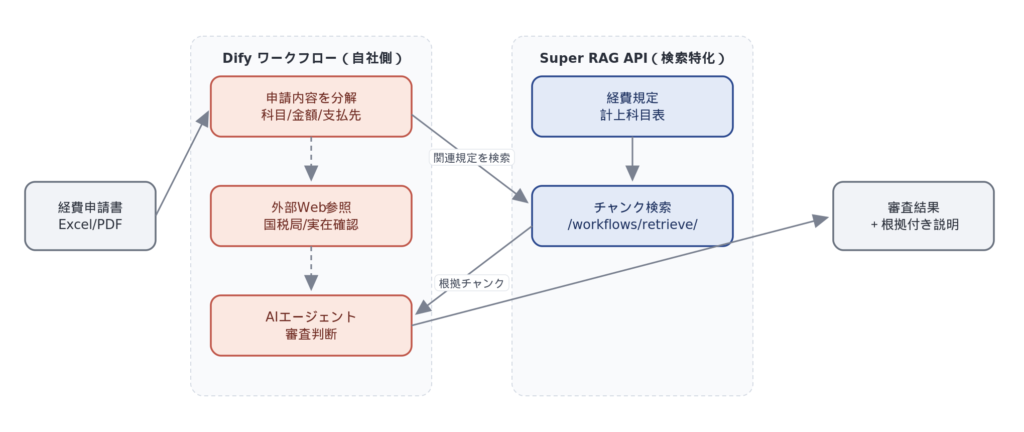
Search the Super RAG API from Dify's workflow node (/api/v3/workflows/retrieve/ or Dify'sExternal Knowledge APIThe system calls a forwarding service (*) to retrieve relevant expense regulations and account code information. Dify's agent then synthesizes the application details, search results, and external web information to produce a well-supported review decision. Super RAG is responsible only for the most mundane yet crucial aspect of quality: "reading and searching internal documents."
*) External Knowledge API integration will be officially supported in Super RAG 3.4, which is scheduled for release in July 2026 (tentative).
The actual workflow follows the steps outlined below (details will be explored in more detail later in this series).
1. Upload the expense claim form to Super RAG.
2. Extract text information such as subject, description, and amount from the application form.
3. Search for relevant chunks from expense regulations/account code tables via Super RAG.
4. The AI agent makes a review decision based on the application content, search results, and necessary external web information.
5. Output the review results and supporting evidence as text.
6. Final confirmation of personnel
Expense review is just one example. This structure is:Accurate understanding of internal company documents"and"Multi-stage decision-making including external informationIt can be applied to any task that requires both internal and external information. For example, it can be consistently applied to tasks that have a structure of "internal knowledge + external information + multi-stage judgment," such as contract reviews that cross-reference internal regulations with laws and regulations, technical reviews that compare design documents with past incident reports, and estimation support that cross-references specifications with product catalogs.
For quantitative comparative verification results such as "how much accuracy can actually be achieved" and "how do Dify alone, Super RAG alone, and combinations differ," as well as detailed node configurations of the workflow, please refer to the following:We will delve deeper into this in the "Use Case Examples: AI Agent Integration (tentative title)" section planned for the second half of this series.We will discuss how Pattern ② functions in practice and how it affects accuracy.
Based on what we've discussed so far, let's summarize the criteria for making decisions when actually choosing a pattern.Selection of 3 axes and 7 check itemsPlease use this as a starting point for internal discussions.
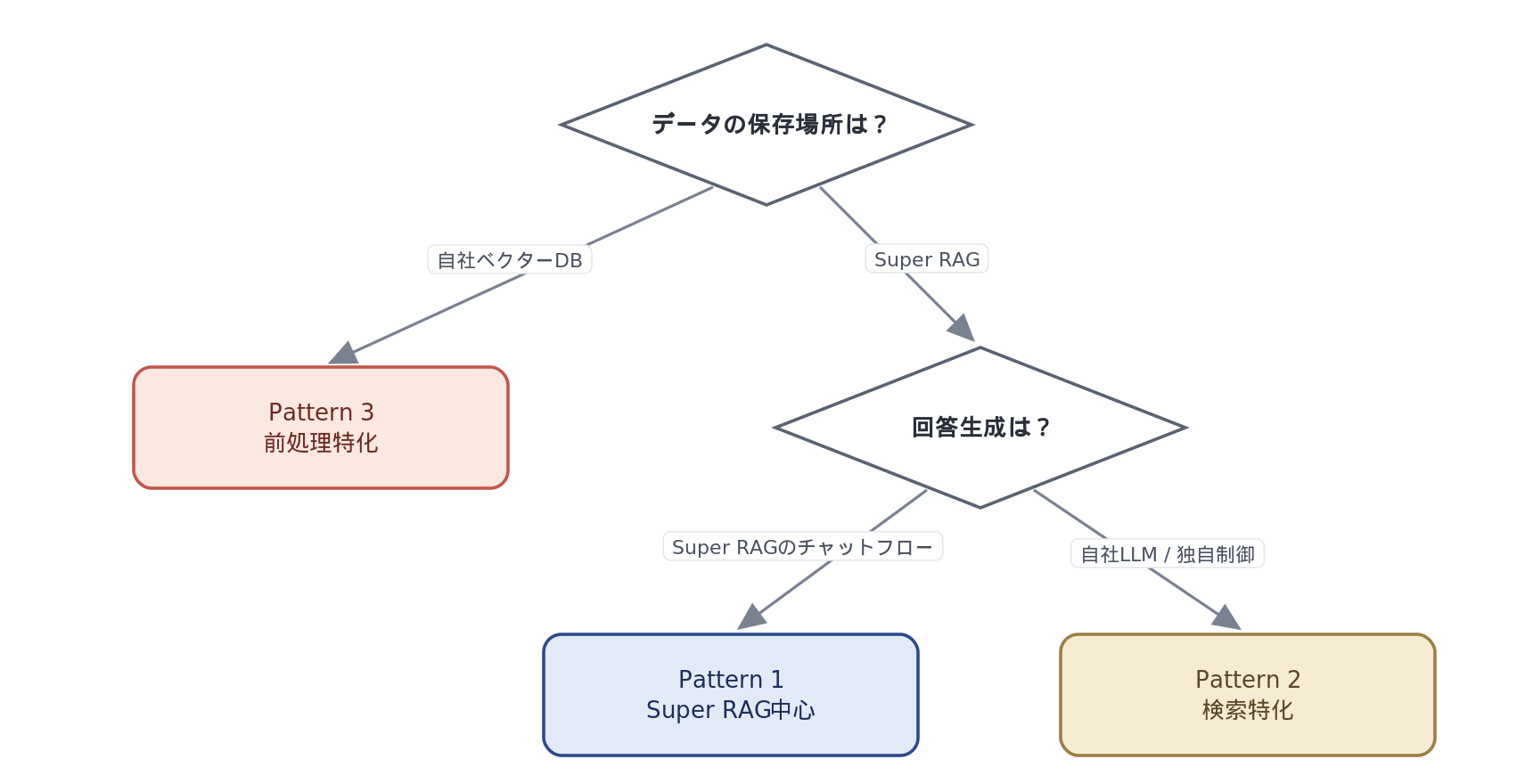
Pattern selection decision flow
The patterns ultimately boil down to the selection of the following three axes:
Axis 1: Where is the data stored?
If you want to place chunks in your company's vector database or existing search infrastructure → Pattern 3 confirmed
Axis 2: Where should the search be performed?
If you store the data on Super RAG, the search will also run on the Super RAG side. This cannot be separated.
Axis 3: Where will the response be generated?
Complete the process using a Super RAG chat flow → Pattern 1/ Controlled independently with our own LLM → Pattern ②
For more practical decision-making, we have prepared a quick reference chart that allows you to identify the most suitable pattern based on the results of the following seven check items.
| perspective | Pattern 1 orientation | Pattern ② | Pattern 3 |
|---|---|---|---|
| Existing assets of Vector DB | None / I'd like to leave it to you | None / I'd like to leave it to you | Yes / I want to make use of it |
| Flexibility in LLM selection and prompt adjustment | Low is fine | I want to hold it high | I want to hold it high |
| External data boundary requirements | It can be deposited into Super RAG. | It can be deposited into Super RAG. | We want to keep it confined to our own system. |
| Importance of implementation speed | top priority | Medium | It can be done later. |
| Development and Operations Resources | few | Medium | There is plenty. |
| Availability of existing workflow tools | none | Dify / n8n etc. available | We have our own proprietary control board. |
| Cost structure preference | Lowest learning cost | LLM is managed in-house. | In-house control, including infrastructure |
The pattern that fits from multiple perspectives becomes the first choice. If it's not possible to completely narrow it down to one pattern, you can start with pattern ② and move to pattern ③ as needed.
*Regarding the "external data boundary requirements," it is possible to install Super RAG within the customer's Azure environment even in cases ① and ②.
Next time (Part 3),API Functionality Catalog — What can be done, and what should be handled in-house?This article will provide a list of Super RAG API functions, such as document extraction, chunking, embedding, search, chat, authentication, and group management, categorized by role. It will also clarify "who is responsible for which pattern" for each function. By reading this in conjunction with pattern selection, it will serve as a "dictionary-like" article that will help you more concretely define the division of roles within your own system.
And the specific accuracy verification results of Pattern ②'s Dify expense review, and a deeper look at the node configuration within the workflow,"Use Case Example: AI Agent Integration (Provisional)"We'll be covering it. Please look forward to it.
The three integration patterns can be summarized by the trade-off that "the closer you are to Super RAG, the fewer and simpler the APIs will be; the closer you are to your own company, the more detailed and numerous the calls will be, but the greater the freedom of control." Pattern 1 prioritizes speed of implementation, Pattern 2 offers flexible combination with existing LLMs and workflow tools, and Pattern 3 leverages existing vector database assets and provides strong control—these are the winning strategies for each pattern.
The configuration of Pattern 2, such as Dify Expense Review, is a good example of how combining tools can reach areas that each tool alone could not, such as "high-precision reading of internal documents" and "flexible multi-stage reasoning flows." When applying this to your own use case, start by organizing which "areas" to entrust to whom, using the decision table at the end of the article as a starting point.
<Articles in this series>